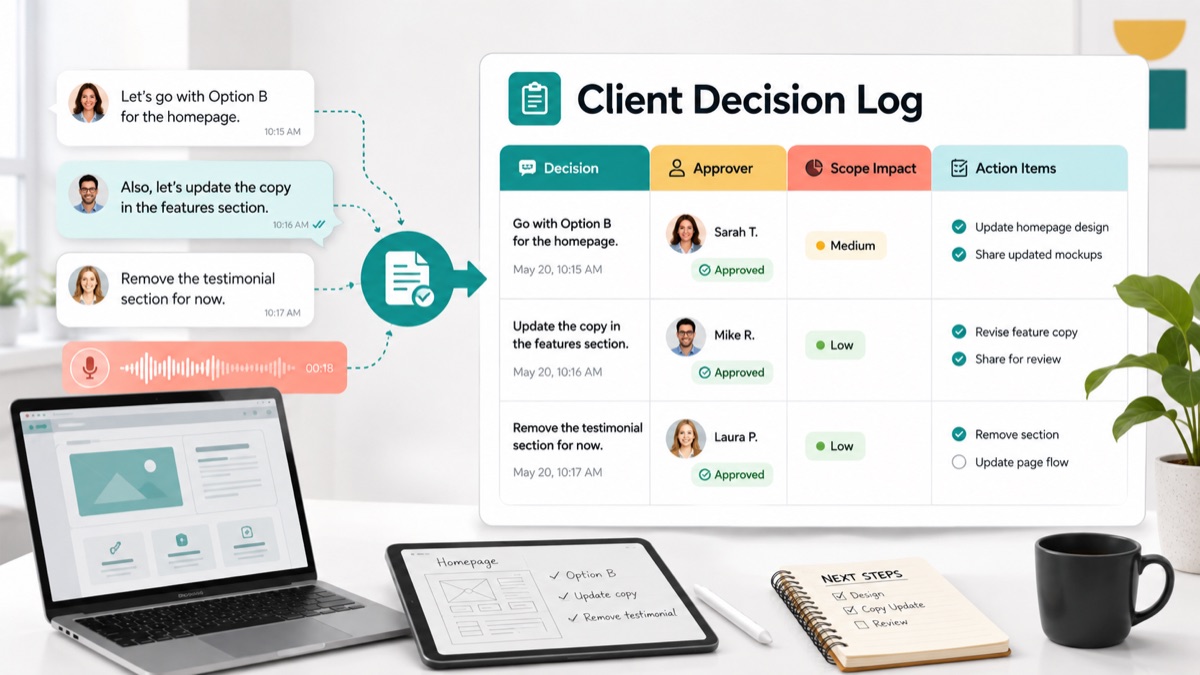
Client decisions often disappear into the busiest parts of agency work. A client says “option B is fine” in a voice note. A stakeholder approves a layout in a comment thread. Someone changes the launch order during a call. Two weeks later, the team is asking who approved what, why the scope changed and which action items were supposed to follow.
For agencies, consultants, creative studios and freelancers, the problem is not only documentation. The real problem is that client decisions affect delivery, scope, budget, feedback, approvals and trust. If decisions are scattered across calls, email, chat and design comments, the team loses the context it needs to move confidently.
This guide gives you a practical client decision log for agencies. It includes a copyable template, decision tables, a raw voice-note-to-decision-record example, a workflow for agencies and a FAQ you can use to keep approvals and action items searchable.
Quick Answer
A client decision log for agencies is a shared record of important client choices, approvals, scope decisions, tradeoffs and follow-up actions during a project. It captures what was decided, who approved it, why it was decided, what it affects and what happens next.
The best decision log is short enough to use every week, but specific enough to protect the project later. It should separate feedback from approval, approval from scope change and scope change from ordinary tasks.
Use this quick structure:
| Decision signal | Log it as | Required fields |
|---|---|---|
| “Approved for launch” | Approval decision | Version, approver, date, next step |
| “Let’s use option B” | Direction decision | Options considered, final choice, reason |
| “Add the comparison block” | Scope decision | Original scope, impact, estimate, approval |
| “Legal needs one more pass” | Dependency decision | Owner, deadline, blocker, escalation path |
| “Move this to phase two” | Deferral decision | Deferred item, reason, revisit date |
| “The CEO should decide” | Authority decision | Decision owner, contributors, due date |
A client decision log gives the agency one source of truth after messy feedback, async voice notes and live calls. VocalJet fits when the decision was spoken: the client records context, then the team turns that voice note into a transcript, decision summary, scope label, action items and follow-up email.
Why Agencies Need A Client Decision Log
Agency projects fail quietly when decisions are remembered differently by different people.
A designer may remember that the client approved the homepage direction. The account lead may remember that approval was conditional. The client may remember that they asked for another stakeholder to review it first. None of those people are acting in bad faith. They are working from different fragments of the same conversation.
Atlassian’s DACI decision-making framework is useful because it separates roles: driver, approver, contributors and informed people. Agencies need a lighter client-facing version of that logic. Every meaningful project decision should have a clear owner, a final approver and a written outcome.
Asana’s action log template also points to an important habit: decisions and follow-ups need owners and due dates in one place. A decision without a next action is just a note. An action item without the decision behind it is hard to defend later.
A client decision log is the operating record that connects client choices to approvals, scope, owners and next steps.
What A Client Decision Log Should Include
A useful client decision log should capture the decision without turning every update into a legal document.
Use these fields:
1 | Decision ID: |
The most important field is Decision type. It tells the team how seriously to treat the record.
| Decision type | Meaning | Agency response |
|---|---|---|
| Direction | Client chooses a creative, strategic or implementation path | Record choice and update delivery tasks |
| Approval | Client signs off on a version, milestone or launch | Record approver, date and version |
| Scope | Client changes deliverables, reviews, timeline or budget | Estimate, approve, defer or swap |
| Dependency | Client must provide content, assets, access or legal input | Assign owner and due date |
| Deferral | Client moves a request to later | Record what is postponed and when to revisit |
| Authority | Team clarifies who can make the decision | Update approver and communication plan |
Use client intake software for agencies or an AI client brief generator when the decision exposes missing context from the original brief. Use scope creep client intake when the decision changes the agreement.
Decision Log vs Action Log vs Approval Record
Teams often mix these records together. That is why project history becomes hard to search.
| Record | Main question | Best for | Common mistake |
|---|---|---|---|
| Decision log | What did we decide and why? | Strategic choices, scope choices, final direction | Logging tasks without the decision behind them |
| Action log | Who will do what by when? | Follow-up, production tasks, client dependencies | Losing the reason for the action |
| Approval record | Who signed off on which version? | Launch approval, milestone acceptance, revision closure | Treating vague praise as approval |
| Change request | What changes scope, cost or timeline? | Added deliverables, extra rounds, rush work | Starting work before approval |
Atlassian’s scope creep guide frames scope creep as work expanding beyond the original plan without matching approval, time, budget or resources. A decision log helps agencies catch the moment a casual preference becomes a real scope decision.
For feedback-heavy projects, pair the log with async client feedback, voice feedback for agencies and client feedback to action items. Feedback explains what the client wants. The decision log records what the project will actually do.
Client Decision Log Template For Agencies
Copy this into your project management system, client workspace, shared doc or internal operating system.
1 | Client decision log |
This template works because it keeps the client decision close to the work it changes. It does not ask the team to write a long report. It asks for enough context to prevent confusion later.
Best Workflow For Agencies, Consultants And Freelancers
For client-facing service teams, the best workflow is to log decisions at the moment they affect delivery, not at the end of the project.
1. Decide What Counts As A Decision
Do not log every sentence.
Log a client message when it affects:
- direction;
- approval;
- scope;
- budget;
- timeline;
- stakeholder authority;
- client-owned dependencies;
- delivery risk.
If a message only says “thanks” or “looks good” without a version, decision owner or next step, treat it as feedback until confirmed.
2. Capture The Client’s Original Words
Preserve the raw input before summarizing it.
Client decisions can arrive through email, voice notes, calls, comments, forms or project tools. The exact wording matters because small phrases often signal assumptions: “quick”, “just”, “if possible”, “before launch”, “our CEO asked” or “legal might need to see it.”
Use client voice notes to action items when the decision was spoken and needs to become a transcript, summary, tasks, owners and follow-up-ready text.
3. Separate Decision, Reason And Action Items
A clean record has three layers:
| Layer | Example |
|---|---|
| Decision | Use pricing layout option B for launch |
| Reason | It makes the enterprise tier easier to compare |
| Action items | Update homepage design, revise pricing copy, send final review link |
This prevents the action items from floating without context.
4. Identify The Real Approver
Client-facing teams need a named approver, not a vague group.
Atlassian’s DACI model makes a sharp distinction between people who contribute input and the one person who approves the decision. In agency work, that distinction protects delivery. Stakeholders can comment, but the project still needs one final decision owner.
When approval is unclear, connect the issue to a client approval workflow for agencies before production continues.
5. Send The Follow-Up While Context Is Fresh
Every decision log entry should produce a short written recap.
1 | Subject: Confirming decision: [Project] - [Decision] |
GitLab’s communication handbook is a strong reference for this habit because it treats async communication as documentation, not just messaging. For agencies, the follow-up is what turns a spoken decision into a durable project record.
Raw Client Voice Note To Decision Log Example
Here is how one messy client update becomes a useful decision record.
Raw Client Voice Note
1 | I talked to sales this morning. Let's go with option B for the homepage hero because it explains the offer more clearly. We can skip the testimonial section for launch if that keeps us on schedule. Legal still needs to approve the ROI line, so don't publish that part yet. Also, our founder wants to see the final page before it goes live, but she is traveling until Wednesday. |
Structured Decision Log
| Field | Structured output |
|---|---|
| Decision title | Homepage launch direction |
| Decision type | Direction, dependency and approval |
| Original client words | “Let’s go with option B for the homepage hero” |
| Decision summary | Use hero option B for launch |
| Reason | Sales believes option B explains the offer more clearly |
| Affected deliverable | Homepage hero and launch page |
| Scope impact | Testimonial section deferred, no added scope if removed for launch |
| Dependency | Legal approval needed for ROI line |
| Approval owner | Founder for final page approval |
| Timeline impact | Founder travel may affect launch review |
| Agency action | Update hero, remove testimonial section from launch version, hold ROI line |
| Client action | Confirm founder review window and legal-approved claim |
| Follow-up needed | Send written recap with launch decision and blocked items |
Action Items
| Action item | Owner | Due date | Source decision |
|---|---|---|---|
| Update homepage hero to option B | Agency designer | Today | Homepage launch direction |
| Remove testimonial section from launch version | Agency developer | Today | Homepage launch direction |
| Confirm legal-approved ROI claim | Client marketing lead | Wednesday | Legal dependency |
| Confirm whether founder approval blocks launch | Client marketing lead | Wednesday | Final approval owner |
| Send final review link after updates | Agency PM | Today | Homepage launch direction |
This is the difference between “the client sent a voice note” and “the team has a decision, risk and next step.”
When A Decision Needs A Change Request
Not every client decision changes scope. Some decisions simply choose between options already included in the project.
Use this table before turning a decision into production work:
| Question | If yes | If no |
|---|---|---|
| Was this option already included in the agreed scope? | Log as direction or approval | Continue checking |
| Does it add a new deliverable, page, asset, stakeholder or review round? | Treat as potential scope change | Continue checking |
| Does it affect the launch date or delivery sequence? | Record timeline impact | Continue checking |
| Does it require extra budget or resources? | Send estimate before work starts | Continue checking |
| Does it replace one scoped item with another? | Confirm the swap in writing | Keep as normal decision |
PMI’s scope management guidance emphasizes that changes to an approved baseline should be identified, communicated, coordinated and approved before work starts. Agencies do not need heavyweight governance for every client project, but they do need the same discipline when a decision changes scope.
How VocalJet Fits This Workflow
Client decisions often happen in the channel that is easiest for the client, not the channel that is easiest for the agency to search later.
VocalJet gives agencies a product path for those moments:
- the client records a nuanced decision by voice;
- the agency gets the transcript and summary;
- the team extracts the decision, approver, scope impact and open questions;
- the spoken context becomes action items and a follow-up email;
- the decision record can be searched and shared later.
Async voice feedback helps agencies capture the context behind a decision without forcing another meeting. A client decision log makes that context operational.
Use the decision log with voice feedback for agencies, client feedback to action items and client voice notes to action items when a decision starts as spoken feedback.
FAQ
What is a client decision log for agencies?
A client decision log for agencies is a shared record of important client choices, approvals, scope decisions and follow-up actions during a project.
What should a client decision log include?
A client decision log should include the original client words, decision summary, decision type, final approver, affected deliverable, reason, scope impact, timeline impact, budget impact and action items.
Is a decision log the same as an action log?
No. A decision log records what was decided and why. An action log records who will do what by when. Agencies usually need both because client decisions create action items.
When should an agency log a client decision?
An agency should log a client decision when it affects direction, approval, scope, budget, timeline, stakeholder authority, dependencies or delivery risk.
How does a decision log prevent scope creep?
A decision log helps prevent scope creep by showing when a client choice changes deliverables, review rounds, budget, resources or timeline before the team starts extra work.
How can VocalJet help with client decision logs?
VocalJet helps when decisions are explained by voice. The recording can become a transcript, summary, action-item list, scope label and follow-up message that the agency adds to the decision log.
Final Recommendation
Start with a simple rule: log every client decision that affects direction, approval, scope, timeline, budget or ownership.
For agencies, the decision log should be lighter than a contract and stricter than a meeting note. Preserve the client’s original words, name the final approver, connect the decision to action items and send a written recap while the context is fresh.
When the decision is easier for the client to explain by voice, use VocalJet to capture the recording, structure the decision and turn it into follow-up-ready work.