
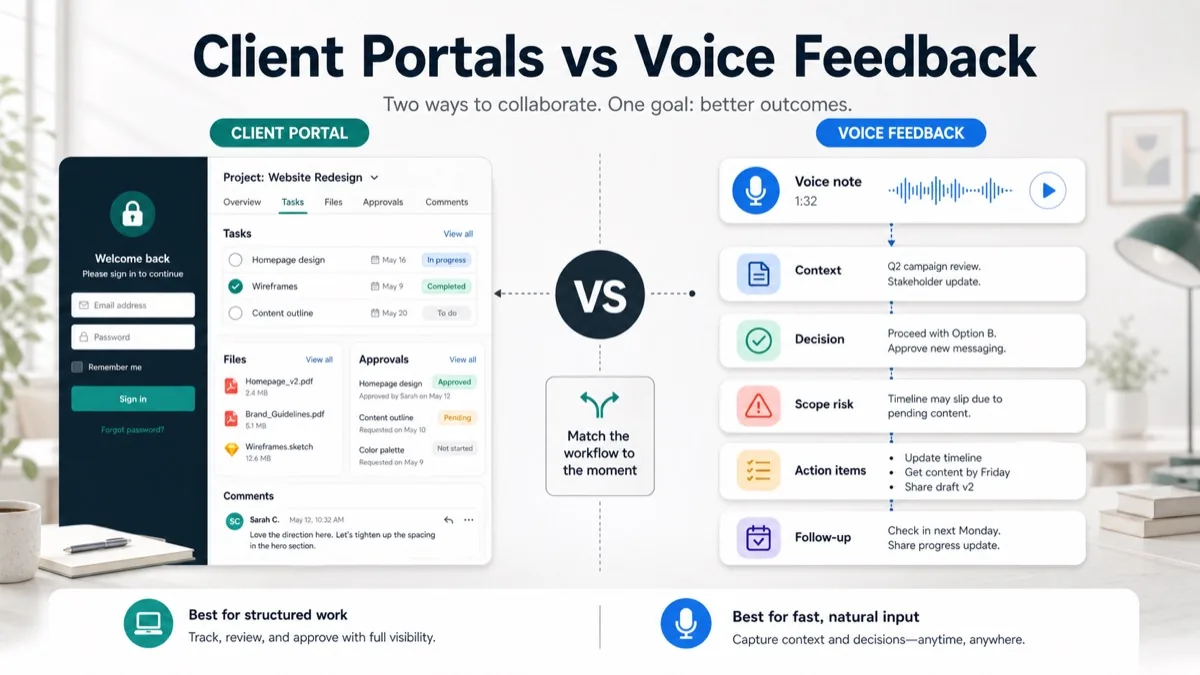
Client portals promise order: one login, one project space, one place for tasks, files, comments and approvals. For agencies, consultants, studios and freelancers, that can be useful once a project has enough structure. The problem is that many client communication issues happen before the client is ready to live inside another tool.
Async voice feedback gives clients a lighter way to explain what they mean, why a revision matters, who still needs to approve it and what might change scope. Instead of chasing scattered comments or forcing another meeting, the agency can turn a short voice note into a feedback summary, decision record, action items and follow-up email.
This guide compares client portals and async voice feedback for client projects, then shows when to use each one and how to combine them without creating more admin work.
Updated 30 October 2026 by Équipe VocalJet. Product descriptions now distinguish recording and transcription from the review, briefs and follow-ups prepared by people.
Quick Answer
Client portals are best when the agency and client need a shared workspace for project visibility, files, tasks, approvals and repeatable collaboration. Async voice feedback is better when the agency needs rich client context quickly without asking the client to log into another system or join another call.
A client portal is a shared client workspace where project information, tasks, files, comments and approvals can live in one controlled environment. Async voice feedback is a workflow where clients record spoken feedback on their own time, then the agency turns that voice note into decisions, scope signals, action items and follow-up.
For most agency projects, the best workflow is hybrid: use a portal for structured project operations, and use async voice feedback for messy context, revision nuance, stakeholder reasoning and scope-sensitive requests.
| Workflow | Best for | Weakness | Best output |
|---|---|---|---|
| Client portal | Project visibility, files, tasks, permissions, approvals | Login friction and low-context comments | Shared project record |
| Async voice feedback | Nuance, explanation, stakeholder context, scope signals | Needs a structured summary afterward | Feedback brief and action items |
| Email-only feedback | Quick replies and familiar client behavior | Scattered context and weak traceability | Short confirmation |
| Hybrid workflow | Client-facing projects with revisions and approvals | Requires clear routing rules | Portal record plus feedback summary |
If you already collect feedback asynchronously, connect this workflow to async client feedback, an async client feedback tool, voice feedback for agencies, client feedback to action items, client feedback software for agencies, client voice notes to action items and Loom alternative client feedback.
What Client Portals Are Best For
Client portals are useful when the work needs a shared operational layer. They help agencies create one place for project status, files, permissions, approvals, messages and tasks.
Teamwork’s client user documentation describes portal-style collaboration around client project visibility, contextual task conversations and trackable approval work. That is the core strength of a portal: it gives the client a place to see what is happening and gives the agency a controlled environment for project records.
Use a client portal when:
- the project has many deliverables, files or milestones;
- the client needs repeated visibility into status;
- approvals must be tracked across versions;
- there are recurring tasks or long-term retainers;
- several client stakeholders need controlled access;
- the agency needs a documented project hub.
Client portals work best after the project has a clear operating rhythm. They are weaker when the client just needs to explain a confusing revision, a concern, a late stakeholder opinion or a scope-sensitive request.
What Async Voice Feedback Is Best For
Async voice feedback helps agencies capture the context behind a client comment without scheduling another meeting. The client records a short voice note, and the agency converts that spoken input into a structured feedback record.
Async client feedback helps agencies collect richer revision context without scheduling another meeting. It is especially useful when written comments are too short, too vague or too political to turn directly into tasks.
Use async voice feedback when:
- the client says “something feels off” but cannot explain it in one sentence;
- a stakeholder needs to give context but cannot attend a review call;
- the feedback may affect scope, timeline or approvals;
- the agency needs to separate decisions from opinions;
- the team needs action items, owners and follow-up questions;
- the client is unlikely to log into a portal for one comment.
GitLab’s communication handbook frames async communication as a way to move work forward without every stakeholder being available at the same time, while also noting that some decisions still need synchronous conversation. That distinction matters for client projects: voice feedback can capture context async, while calls remain useful for conflict, negotiation and final alignment.
Client Portals vs Async Voice Feedback Decision Matrix
The right choice depends on the job the client communication is supposed to do.
| Client communication job | Use client portal | Use async voice feedback | Why |
|---|---|---|---|
| Share project files | Yes | No | The portal is better as a file and version hub. |
| Explain a vague revision | Maybe | Yes | Voice captures reasoning and nuance faster. |
| Track final approval status | Yes | Maybe | The portal records the status; voice explains the decision. |
| Collect stakeholder context | Maybe | Yes | Stakeholders can speak naturally without joining a call. |
| Manage recurring client work | Yes | Maybe | Portals help with repeatable operations. |
| Clarify scope risk | Maybe | Yes | Voice helps surface assumptions before work starts. |
| Keep comments on a design file | Yes | Maybe | Figma comments keep visual feedback close to the asset. |
| Turn feedback into tasks | Maybe | Yes | Voice notes need structured extraction into action items. |
| Give clients one source of truth | Yes | No | Portals are stronger for shared status and archives. |
| Reduce meetings without adding logins | No | Yes | Voice feedback is lighter for clients. |
Figma’s comments documentation is a good reminder that location matters: comments attached to the work can speed review. But location is not the same as meaning. Agencies still need to know whether a comment is an approved change, an open question, a scope change, a dependency or a personal preference.
Best Workflow For Agencies, Consultants And Freelancers
The best workflow for agencies, consultants and freelancers is to route client input by effort and risk. Use the portal for durable project operations. Use voice feedback when the client needs to explain context. Use a call only when there is conflict, negotiation or a decision that cannot be resolved async.
1. Keep The Portal For Structured Work
Use the client portal for:
- approved deliverables;
- project timeline;
- file versions;
- final approval status;
- recurring tasks;
- formal handoff notes.
Do not make the portal the only way a client can communicate. If every small clarification requires a login, feedback will move back to email, Slack or scattered calls.
2. Ask For Voice When Context Is Missing
Use this prompt when a written comment is too thin:
1 | Could you record a short voice note explaining: |
This prompt turns vague feedback into usable project context without forcing the client into a meeting.
3. Convert The Voice Note Into A Feedback Record
A client feedback workflow turns spoken feedback into a decision, task, question, dependency or scope risk before the team starts revising.
Use this routing table:
| Feedback signal | Label it as | Next action |
|---|---|---|
| “Approved, ship this” | Decision | Lock the approval and record version |
| “Can we try another direction?” | Open question | Ask what outcome should change |
| “Legal wants to review” | Dependency | Assign client approval action |
| “Add one more section” | Scope risk | Estimate, defer or swap scope |
| “The tone feels wrong” | Context | Ask for example or voice explanation |
| “Use option B, but update the CTA” | Task plus decision | Create revision task and confirm owner |
4. Put The Summary Back Where Work Happens
Once the voice note is structured, add the summary back to the project record, whether that is a portal, project management tool, design file, task tracker or email thread. The goal is not to create another inbox. The goal is to make the client’s spoken context reusable.
5. Use Calls Only For High-Friction Decisions
Use a live call when:
- stakeholders disagree;
- the client needs strategic guidance;
- scope, budget or timeline must be negotiated;
- the issue is sensitive;
- the written or voice context still leaves a major decision unresolved.
Asana’s project closure guidance treats sign-off and documentation as part of finishing a project cleanly. Agencies can apply the same principle during revision cycles: every approval should leave a clear record of what was approved, what changed and what happens next.
Raw Voice Feedback To Structured Output
Here is what an async voice feedback workflow can produce.
Raw client voice note
1 | I like the new homepage direction, especially the proof section, but the headline may be too bold for our enterprise audience. Sales likes it because it is punchy, but legal has not approved the claim yet. Can we keep the layout, soften the claim, and maybe add a short comparison block before the demo CTA? I do not know if that counts as a new section or just copy polish. |
Structured agency output
| Field | Extracted detail |
|---|---|
| Decision | Homepage layout direction is approved. |
| Revision task | Soften the hero claim for enterprise buyers. |
| Dependency | Legal must approve the claim before final copy. |
| Scope risk | New comparison block may add strategy, copy and design work. |
| Open question | Is the comparison block required for launch or a phase-two idea? |
| Client action item | Confirm legal approver and comparison block priority. |
| Agency action item | Draft revised claim and estimate comparison block if required. |
| Follow-up | Send summary with included revision and optional add-on path. |
This is the difference between “client left feedback” and “the team knows what to do next.” The second version protects time, scope and accountability.
When A Client Portal Is Better
A client portal is better when the client needs durable access to project information.
Use a portal for:
- long projects with multiple milestones;
- retainers with recurring deliverables;
- file sharing and version history;
- formal approvals;
- client-facing task lists;
- onboarding checklists;
- status visibility for several stakeholders.
The portal should answer “where is the project?” and “what has been approved?”
When Async Voice Feedback Is Better
Async voice feedback is better when the client needs to explain a thought, not manage a project.
Use voice feedback for:
- vague comments;
- creative direction;
- revision rationale;
- stakeholder context;
- scope-sensitive requests;
- approval blockers;
- post-review follow-up.
Voice feedback should answer “what does the client mean?” and “what should we do next?”
How VocalJet Fits This Workflow
VocalJet offers a voice-message link when the client needs to explain something that is awkward to type into a portal. It records and transcribes the explanation. The agency checks the transcript, writes the summary and adds agreed decisions, questions and actions to its existing project record.
That makes VocalJet useful alongside a client portal, not only instead of one. Use the portal as the durable project hub. Use VocalJet when the client needs to explain context, clarify a revision, describe a concern or approve a direction in their own words.
The practical result is fewer empty portal comments, fewer “quick calls” and clearer project records.
FAQ
Are client portals better than async voice feedback?
Client portals are better for structured project visibility, files, permissions, tasks and approval status. Async voice feedback is better for capturing client reasoning, revision context, stakeholder nuance and scope-sensitive requests.
Can async voice feedback replace a client portal?
Async voice feedback can replace a portal for lightweight feedback collection, but it should not replace a portal when the project needs shared files, task visibility, permission control or long-term project records.
When should an agency ask for voice feedback?
An agency should ask for voice feedback when a written comment is vague, when a stakeholder needs to explain reasoning, when feedback may affect scope, or when another meeting would slow the project down.
What should a client voice feedback prompt ask?
A client voice feedback prompt should ask what item is being reviewed, what feels wrong, what outcome the client wants, whether the feedback blocks approval, who approves it and whether it changes scope or timeline.
How do you turn voice feedback into action items?
Turn voice feedback into action items by extracting the decision, task, owner, dependency, scope risk, open question and follow-up message before the team starts revising.
How can VocalJet help agencies that already use a client portal?
VocalJet records and transcribes the context a client wants to explain aloud. The agency reviews the source, writes its summary and manually adds the decisions and follow-ups to the portal. No portal synchronization or automatic task assignment is implied.