
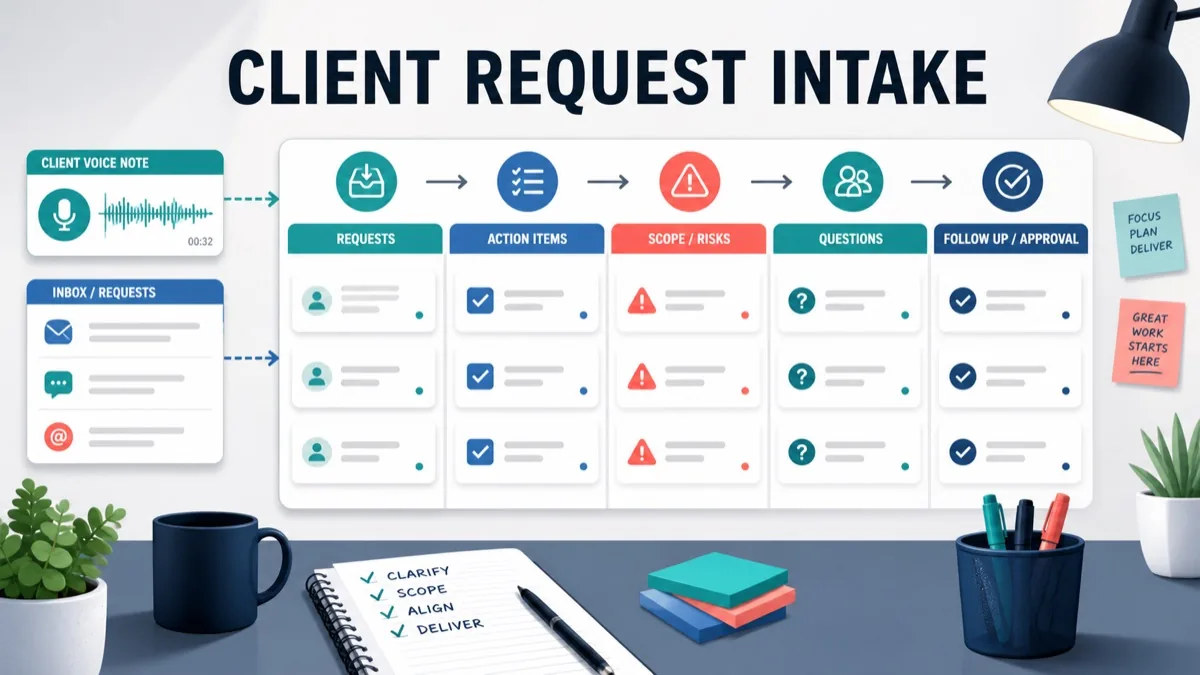
Client requests rarely arrive in the format an agency needs. They arrive as email threads, voice notes, Slack messages, review comments, screenshots, forwarded stakeholder feedback and “quick asks” attached to another conversation.
For agencies, consultants, creative studios and freelancers, the risk is not that clients ask for work. The risk is that every request becomes a task before anyone checks priority, owner, deadline, scope, dependencies or approval. That creates duplicated work, missed requests, unpaid revisions, scattered follow-up and unclear project status.
This guide gives client-facing teams a practical client request intake workflow. It shows how to capture requests, turn voice or written context into structured work, triage each request, protect scope and send a clear follow-up without scheduling another call.
Updated 30 October 2026 by Équipe VocalJet. Product descriptions now distinguish recording and transcription from the review, briefs and follow-ups prepared by people.
Quick Answer
A client request intake workflow is the process an agency uses to capture, classify, prioritize and route incoming client requests before they become delivery work.
For agencies, client request intake should separate five outputs: included tasks, clarification questions, client-owned dependencies, approval decisions and scope-change risks. A request should not move into production until the team knows what the client is asking for, why it matters, who owns the next step and whether it changes the agreement.
Use this quick triage table before assigning work:
| Client request signal | Intake category | Next step |
|---|---|---|
| “Can you fix this typo?” | Included task | Add to the current revision queue |
| “Can we add another section?” | Potential scope change | Estimate, defer or swap scope |
| “Legal needs to check this first” | Client dependency | Assign client owner and due date |
| “I am not sure what I mean, but…” | Clarification needed | Ask for voice context or examples |
| “The CEO wants a different direction” | Approval risk | Confirm final decision owner |
| “This has to launch Friday” | Timeline risk | Check resources, scope and tradeoffs |
The strongest workflow is to collect the request in one place, preserve the client’s original words, use voice when the context is nuanced, then turn the intake record into action items, scope labels and a follow-up summary. VocalJet fits this workflow when a client can explain the request faster by voice than by filling out another form.
Why Client Request Intake Breaks In Agencies
Client-facing teams often have request volume, not request clarity.
A web design client may send a screenshot in email, a stakeholder may leave comments in Figma, an account manager may receive a voice note, and the founder may add a new priority during a separate thread. Each message may be reasonable on its own. Together, they create operational noise.
Teamwork’s client requests intake template frames the problem clearly: client work needs a shared queue where requests can be captured, prioritized and assigned instead of staying scattered across channels. Teamwork’s forms documentation also shows why structured submissions matter: a form can collect consistent information and turn responses into project tasks.
Forms help with repeatable fields. They do not always capture nuance. A client may know why a request matters but not how to categorize it. That is where async voice intake is useful.
Client request intake is the workflow of turning incoming client asks into structured work records before a team commits delivery time.
What A Client Request Intake Record Should Capture
A useful request record is shorter than a full brief, but stricter than a forwarded email.
Capture these fields for every client request:
1 | Client: |
The most important fields are not administrative. They are decision fields:
| Field | Why it matters |
|---|---|
| Original request | Preserves what the client actually said |
| Client goal | Separates business need from proposed solution |
| Affected deliverable | Shows whether current scope is touched |
| Decision owner | Prevents comments from becoming approvals |
| Scope status | Protects margin before work starts |
| Next action | Turns intake into movement |
If the request comes from a new project or a large phase change, connect intake to client intake software for agencies, a voice intake form or a client brief review workflow so the team can rebuild the larger context before estimating.
The Client Request Intake Workflow
Use this workflow for retainers, active projects, website changes, creative revisions, campaign updates, consulting deliverables and support-style client work.
1. Capture The Request In One Intake Queue
Do not let work start from whichever channel shouted first.
Create one place where every new client ask lands. That may be your project management system, a shared inbox, a ticket board or a lightweight intake table. The point is not the tool. The point is that each request gets an owner and a status before the team acts.
If a request arrives by voice, paste the transcript or summary into the same queue. If it arrives by email, preserve the email. If it arrives in a design tool, link the comment thread.
2. Preserve The Client’s Words Before Rewriting
Do not translate the request too early.
A client may say, “Can we make this section more premium?” That is not a task. It is a signal. The task might be copy revision, visual hierarchy, pricing repositioning, testimonial proof, brand tone or a full strategy decision.
Preserve the raw wording first. Then add your structured interpretation below it.
Async client feedback helps agencies collect richer revision context without scheduling another meeting. It becomes operationally useful when the team turns that context into a classified request record.
3. Classify The Request Before Assigning Work
Every request should receive one primary category.
| Category | Meaning | Agency action |
|---|---|---|
| Included task | Fits current scope and phase | Assign to delivery |
| Clarification question | Request is vague or missing context | Ask one focused question |
| Client dependency | Client must provide input or approval | Assign client owner and due date |
| Approval decision | Request affects sign-off or version choice | Confirm decision owner |
| Scope change | Adds deliverable, effort, review, timeline pressure or budget impact | Estimate, defer or swap |
| Backlog item | Valuable, but not needed now | Park for later phase |
Atlassian’s change control process guide describes change control as a structured way to evaluate modifications to scope, schedule or resources. Agencies do not need enterprise ceremony for every small request, but they do need the same operating principle: evaluate impact before implementing.
4. Decide Whether Voice, Form Or Comment Is Best
Different requests need different collection methods.
| Intake method | Best for | Weakness |
|---|---|---|
| Form | Repeatable facts, required fields, simple routing | Clients may under-explain context |
| Formal approvals, longer written summaries | Threads become hard to search | |
| Design comments | Asset-specific feedback | Comments often lack business rationale |
| Voice note | Nuance, urgency, stakeholder context, uncertainty | Needs transcription and structuring |
| Meeting | Complex tradeoffs or conflict | Slower, harder to search, adds scheduling |
Use voice feedback for agencies when the client needs to explain why a request matters, what should change, what is blocked or which stakeholder has the final say. Use client feedback to action items when the request is already feedback and the team needs owners, tasks, questions and scope labels.
5. Convert The Request Into Action Items
Intake is only useful if it changes what happens next.
For each request, create:
- one agency-owned next action;
- one client-owned next action if needed;
- one scope status;
- one decision owner;
- one follow-up message.
Asana’s change log template is useful because it treats project changes as records with status, ownership, approval and history. In agency work, that record does not need to be complex. It just needs to be findable.
Use client voice notes to action items when a voice request needs to become tasks, owners, due dates, questions and follow-up-ready text.
Raw Client Request To Structured Intake Example
Here is how an agency can turn one messy client message into a usable request record.
Raw Client Voice Note
1 | The new landing page is getting close. I like the direction, but sales thinks we should add a comparison block before the pricing section. Legal also flagged the ROI claim, so maybe avoid that until they approve it. Could we still launch next Friday? Also, our CEO asked if she can review the final page before it goes live, but she is traveling this week. |
Structured Request Intake
| Field | Structured output |
|---|---|
| Client goal | Improve confidence before pricing while keeping launch date |
| Request 1 | Add comparison block before pricing |
| Request 1 category | Potential scope change |
| Request 2 | Hold or revise ROI claim |
| Request 2 category | Client dependency and legal approval |
| Request 3 | Preserve next Friday launch |
| Request 3 category | Timeline risk |
| Request 4 | CEO final review before launch |
| Request 4 category | Approval risk |
| Agency owner | Project manager |
| Client owner | Marketing lead |
| Decision owner | Confirm whether CEO or marketing lead owns final sign-off |
| Scope status | Needs estimate or swap before adding comparison block |
Action Items
| Action item | Owner | Type | Timing |
|---|---|---|---|
| Estimate comparison block or propose phase-two deferral | Agency | Scope decision | Today |
| Confirm legal-approved copy for ROI claim | Client | Dependency | Before final copy |
| Confirm whether CEO approval is required for launch | Client | Approval decision | Today |
| Send revised launch options | Agency | Follow-up | Today |
This is the difference between “client has feedback” and “the agency knows what to do next.”
Client Request Intake Template
Copy this template into your project tool, shared doc or intake board.
1 | Client request intake |
Keep the template visible. If the team has to search five places to know whether a request was approved, intake has failed.
Best Workflow For Agencies, Consultants And Freelancers
The best workflow for agencies, consultants and freelancers is a hybrid intake system: structured fields for predictable routing, voice notes for unclear context and written summaries for decisions.
Step 1: Define One Intake Path
Tell clients where requests go. For active projects, this may be a shared request link, project board, inbox or async client feedback workflow.
Step 2: Ask For Voice When The Request Is Vague
Use a short prompt:
1 | Please record a quick note explaining what you want changed, why it matters, whether it affects launch timing, who needs to approve it and whether it replaces or adds to the current scope. |
The client can record the explanation in VocalJet, which supplies a transcript. The intake owner checks the wording, identifies open questions and scope risks, then writes the request record and follow-up before assigning work.
Step 3: Triage Before Delivery
Before assigning the request to production, compare it with the brief, SOW, approval record or scope summary.
Atlassian’s scope creep guide recommends making changes visible, evaluating impact and recording decisions. For agencies, that means no request should become hidden unpaid work just because it sounded small.
Use scope creep client intake when new requests start changing deliverables, review rounds, stakeholders, dependencies or timeline.
Step 4: Send A Clear Follow-Up
Close the loop in writing:
1 | Thanks, captured. |
If the intake queue starts producing repeated scope decisions, connect the workflow to async client feedback tool, client feedback software for agencies and the pricing path when the team needs a repeatable productized workflow.
FAQ
What is client request intake?
Client request intake is the workflow of capturing, classifying and routing incoming client asks before they become delivery tasks, clarification questions, dependencies, approvals or scope changes.
What should a client request intake form include?
A client request intake form should include the original request, client goal, affected deliverable, deadline, category, scope status, agency owner, client owner, decision owner, dependencies and next action.
How do agencies prioritize client requests?
Agencies should prioritize client requests by checking urgency, business impact, affected deliverable, launch dependency, approval owner, scope impact and whether the request replaces or adds to existing work.
When should a client request become a change request?
A client request should become a change request when it adds deliverables, effort, approval rounds, stakeholders, dependencies, budget impact or timeline pressure that was not included in the current agreement.
Is voice better than a form for client request intake?
Voice is better than a form when the client needs to explain nuance, priority, stakeholder context or uncertainty. Forms are better for repeatable facts and required fields.
How does VocalJet help with client request intake?
VocalJet records and transcribes client voice requests. The agency checks the transcript, identifies scope questions and writes the request record, actions and follow-up. Confirm the interpretation with the client before treating it as agreed work.