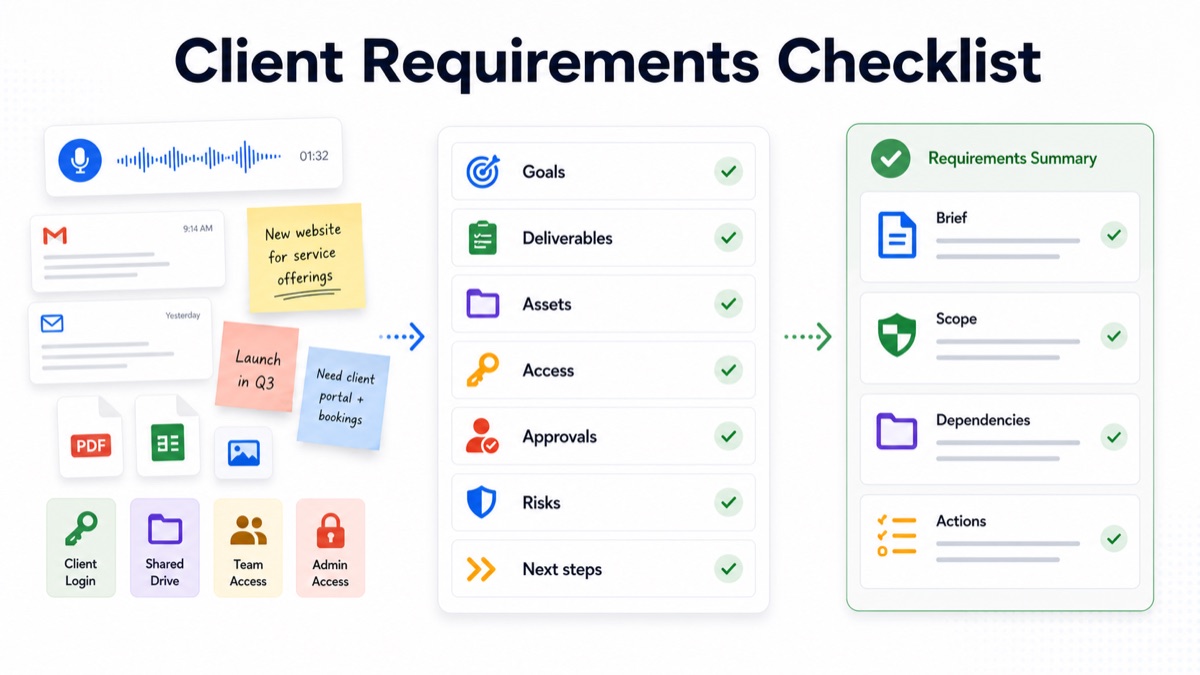
Client requirements gathering is the workflow of turning a client’s early request into usable project requirements before proposal, kickoff or delivery. For agencies, consultants, studios and freelancers, that means collecting more than a list of desired deliverables.
You need goals, success criteria, constraints, assets, access, stakeholders, approval rules, risks, assumptions and next steps. Without that structure, a friendly request like “we need a new client portal” can hide content work, technical dependencies, security decisions, extra reviewers and scope changes that were never priced.
This checklist helps client-facing service businesses gather requirements in a way that creates a brief, clarifies scope and turns missing information into action items.
Quick Answer
A client requirements gathering checklist is a structured list of questions and outputs used to collect project goals, deliverables, boundaries, client inputs, access needs, approvals, constraints, risks and action items before work begins.
For service businesses, requirements gathering should produce three outputs: a project brief, a scope check and a next-step list. If the client only gives scattered emails, short form answers or a vague call summary, the team still has to guess.
Use this checklist as the short version:
| Requirement area | Question to answer | Output you need |
|---|---|---|
| Goal | What should this project achieve? | Business outcome |
| Deliverables | What should exist at the end? | Included work |
| Boundaries | What is not included yet? | Exclusions and assumptions |
| Inputs | What must the client provide? | Assets and dependencies |
| Access | Which tools, accounts or permissions are needed? | Access checklist |
| Approvals | Who gives feedback and final approval? | Decision owner |
| Risks | What could block or delay the work? | Risk register |
| Next steps | Who does what next? | Action items with owners |
For a product-led workflow, combine voice client intake, a voice intake form, client intake software for agencies, an AI client brief generator, scope creep client intake, and client voice notes to action items.
What Requirements Gathering Should Produce
Requirements gathering fails when it is treated as a conversation instead of an output.
Asana’s guide to a project brief is useful because it puts the project goal, scope, stakeholders and timeline in one written home. Atlassian’s project kickoff play also emphasizes alignment around purpose, responsibilities and success measures.
For a service business, requirements gathering should create a working record your team can use:
| Output | What it answers | Why it matters |
|---|---|---|
| Project brief | Why are we doing this and what matters most? | Aligns strategy and delivery |
| Scope check | What is included, excluded and assumed? | Reduces unpaid expansion |
| Dependency list | What assets, access or decisions are missing? | Prevents hidden delays |
| Approval map | Who can comment and who decides? | Reduces review churn |
| Action items | What must happen next and who owns it? | Moves the project forward |
Client requirements gathering is not the same as asking every possible question. It is the process of converting client context into requirements the team can price, schedule and deliver against.
The Client Requirements Gathering Checklist
Use this checklist before proposal, before kickoff or whenever a vague client request needs to become a defined project.
1 | Client requirements gathering checklist |
This checklist works best when the client can answer in their own words. If the context is too nuanced for a form, ask for a voice response and then structure it.
Voice client intake is a workflow where clients explain project context asynchronously by voice. The useful output is not the recording by itself. The useful output is a brief, scope check, risk list and action items.
Decision Table: Form, Call Or Voice Intake?
Use the format that matches the kind of requirement you need.
| Format | Best for | Weakness | Best output |
|---|---|---|---|
| Static form | Dates, URLs, files, budget ranges and short facts | Thin answers for nuanced context | Intake record |
| Live call | Trust, conflict, negotiation or sensitive tradeoffs | Scheduling cost and weak written record | Shared discussion |
| Voice intake | Context, priorities, uncertainty and assumptions | Needs structured extraction | Brief, scope check and action items |
| Hybrid workflow | Complex projects with async prep first | Requires discipline to avoid duplicate questions | Shorter call and stronger requirements |
The practical rule: use forms for facts, calls for live alignment and voice intake for context that would be painful to type.
Raw Client Request To Structured Requirements
Here is how requirements gathering should transform a vague request.
Raw Client Request
1 | We need a client portal before Q4. It should let clients see updates and maybe upload documents. We also want it to feel more premium than sending email attachments. Our operations lead has thoughts, and the legal team may need to review. We have some content already, but not sure what will be needed. It would be great if bookings could be included too. |
Structured Requirements Output
| Requirement area | Structured output |
|---|---|
| Goal | Reduce email attachment workflows and create a more premium client experience |
| Primary deliverable | Client portal requirements and implementation plan |
| Possible extra scope | Booking functionality needs separate confirmation |
| Inputs needed | Existing content, document types, client update workflow and brand references |
| Access needed | Current website, file storage, client communication tools and security requirements |
| Stakeholders | Operations lead contributes workflow; legal may review privacy and file handling |
| Risks | Q4 timeline, legal review, undefined booking feature and unclear content ownership |
| Open questions | Is this a portal strategy brief, design prototype or implemented portal? |
| Action items | Client lists required portal features; consultant confirms phase-one scope and dependencies |
This is the difference between “client wants a portal” and “we know what must be clarified before we price or build.”
Requirements Gathering Workflow For Agencies, Consultants And Freelancers
Step 1: Capture The Client’s Explanation
Start with the client’s words before you impose structure.
1 | Please explain the project in your own words. |
This prompt works because clients often know the context before they know the requirements.
Step 2: Convert Context Into Requirement Categories
Do not paste the raw answer into a proposal. Sort it first.
| Client signal | Requirement category |
|---|---|
| “We need this live before Q4” | Timeline constraint |
| “Clients should upload documents” | Functional requirement |
| “Legal may need to review” | Approval and compliance risk |
| “It should feel more premium” | Experience requirement |
| “Maybe bookings too” | Scope decision |
| “We have some content” | Asset dependency |
An AI client brief generator turns spoken client context into structured goals, constraints, risks and next steps. That is where requirements gathering becomes operational instead of just conversational.
Step 3: Separate Requirements From Assumptions
Service projects get risky when assumptions are treated as requirements.
| Item | Meaning | Example |
|---|---|---|
| Confirmed requirement | Client has clearly approved it | Portal must support document upload |
| Assumption | Likely true but not confirmed | Client provides final content |
| Open question | Needs decision before pricing | Is booking included in phase one? |
| Exclusion | Not included unless approved later | Custom CRM integration |
| Dependency | Needed before work can move | Legal file-handling policy |
Scope clarification questions help teams separate requested deliverables from assumptions before proposal or kickoff.
Step 4: Turn Gaps Into Action Items
Asana’s guide to action items reinforces the operational point: useful next steps need ownership and clarity.
| Gap | Action item | Owner |
|---|---|---|
| Booking feature unclear | Confirm whether booking is phase one or future scope | Client |
| Content ownership unclear | Name content owner and delivery date | Client |
| Legal review possible | Identify legal reviewer and review timeline | Client |
| Technical access missing | Share platform access or vendor contact | Client |
| Scope not priced | Send phase-one recommendation and optional add-ons | Agency |
Client notes to action items is the workflow of turning raw client context into tasks with owners, deadlines and scope impact.
Step 5: Send A Requirements Confirmation Summary
Before proposal or kickoff, send a concise confirmation.
1 | Thanks for the project context. Here is my current requirements summary: |
This protects both sides. The client can correct assumptions, and your team gets a written record.
Requirements Checklist By Service Type
Different service businesses should emphasize different requirement areas.
| Service type | Requirements to emphasize | Risk if skipped |
|---|---|---|
| Web design agency | Pages, content, integrations, CMS access and approvals | Launch delays and hidden development work |
| Marketing consultant | Goal, audience, channels, metrics and constraints | Strategy that cannot be measured |
| Creative studio | References, brand assets, stakeholders and feedback rules | Subjective review loops |
| Freelancer | Included deliverables, assets, deadlines and revision rules | Unpaid extra work |
| Operations consultant | Current workflow, systems, owners and dependencies | Recommendations that cannot be implemented |
For revision-heavy projects, connect requirements gathering to async client feedback before the first review round. Feedback is easier to manage when the original requirements are visible.
How VocalJet Fits Requirements Gathering
VocalJet helps when requirements are trapped in long emails, calls, vague form answers or client voice notes.
Instead of asking the client to type a perfect brief, send one async voice intake link. The client explains the project in their own words. VocalJet helps turn that spoken context into a searchable summary, structured brief, scope risks, open questions, action items and follow-up-ready email text.
That workflow is useful when:
- the client has context but does not know how to structure it;
- the project has hidden stakeholders, systems or dependencies;
- the team needs a brief before proposal or kickoff;
- the client keeps adding “small” ideas that may affect scope;
- the next step is unclear after discovery.
Requirements gathering should not end with a transcript. It should end with a project record your team can use.
FAQ
What is client requirements gathering?
Client requirements gathering is the process of collecting and structuring the goals, deliverables, constraints, inputs, approvals, risks and next steps needed before a client project can be priced, planned or delivered.
What should a requirements gathering checklist include?
A requirements gathering checklist should include business goals, deliverables, exclusions, assumptions, audience, assets, access, stakeholders, approval rules, constraints, risks and action items.
How is requirements gathering different from client onboarding?
Requirements gathering defines what the project needs before proposal, kickoff or delivery. Client onboarding usually happens after the client agrees to work with you and focuses on starting the engagement cleanly.
Should requirements gathering happen in a form or a call?
Use a form for short facts, a call for live alignment and voice intake when the client needs to explain nuance asynchronously. Many agencies and consultants use voice intake first, then schedule a shorter call only if decisions are blocked.
How does requirements gathering prevent scope creep?
Requirements gathering prevents scope creep by separating confirmed requirements from assumptions, exclusions, dependencies and open questions before work starts. That makes later requests easier to classify as included, changed or out of scope.
How can VocalJet help gather client requirements?
VocalJet lets clients explain requirements by voice, then helps turn the response into a transcript, summary, brief, scope risks, action items and follow-up-ready text that the team can confirm before moving forward.