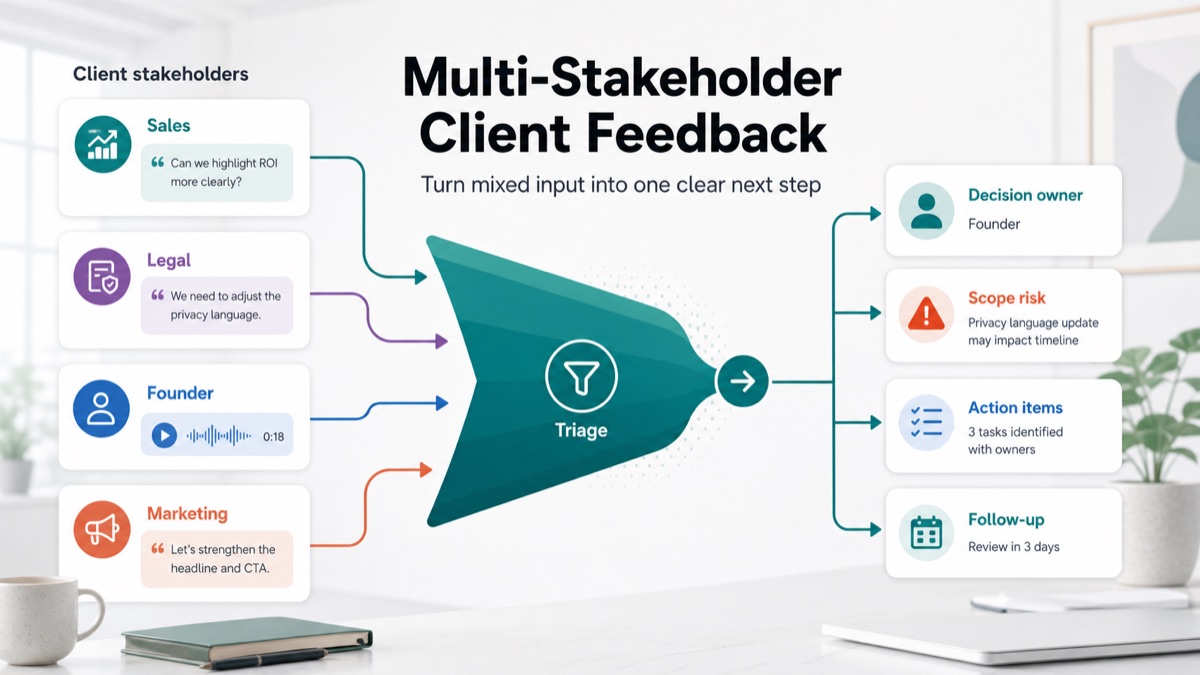
Multiple client stakeholders can make a project better. Sales may know the buyer objections. Legal may protect claims. Leadership may protect positioning. Marketing may understand campaign goals. The problem starts when all of those comments arrive as equal instructions, with no decision owner, no priority and no scope check.
For agencies, consultants, creative studios and freelancers, multi-stakeholder feedback often creates hidden work. A simple review round becomes another strategy discussion, another approval path, another page section or another “small” revision that was never priced.
This guide shows how to collect feedback from multiple client stakeholders without letting mixed opinions become scope creep. The workflow uses async feedback, voice context, stakeholder roles, decision labels and follow-up summaries so the agency can turn scattered input into one clear next step.
Quick Answer
To collect feedback from multiple client stakeholders without scope creep, separate input from decisions. Let every stakeholder explain context, but require one decision owner to approve what becomes work. Then label each comment as an approved change, open question, dependency, conflicting opinion or scope risk before assigning tasks.
Multi-stakeholder client feedback is feedback from several client-side reviewers who may have different goals, authority levels and approval power. It becomes risky when every comment is treated as an instruction instead of being triaged against scope, decision authority and project priorities.
The best workflow is to collect stakeholder feedback asynchronously, ask for voice notes when context is missing, group comments by theme, identify conflicts, route decisions to one approver and send a written summary before the agency starts revising.
| Feedback input | What it means | Agency action | Scope risk |
|---|---|---|---|
| Approved change | Decision owner confirms it | Turn into task | Low |
| Stakeholder opinion | Useful context without authority | Group with similar input | Medium |
| Conflicting feedback | Reviewers disagree | Ask decision owner to choose | Medium |
| New deliverable | Adds work beyond agreement | Estimate, defer or swap scope | High |
| Dependency | Client must provide input or approval | Assign client action item | Medium |
If your team already manages revision comments, connect this workflow to async client feedback, an async client feedback tool, voice feedback for agencies, client feedback to action items, client feedback software for agencies, client voice notes to action items and scope creep client intake.
Why Multi-Stakeholder Feedback Creates Scope Creep
Stakeholder feedback creates scope creep when the agency treats every comment as equal, immediate and included. The risky part is not that stakeholders disagree. Disagreement is normal. The risk is starting work before the client has resolved authority, priority and scope impact.
Atlassian’s stakeholder communication play emphasizes identifying who needs to be informed or involved and clarifying channels and expectations early. Agencies can apply the same idea to client review rounds: decide who gives input, who approves, when feedback is due and what happens when comments conflict.
Multi-stakeholder feedback usually breaks down for five reasons:
- There is no final decision owner.
- Stakeholders comment from different goals.
- Feedback arrives across email, calls, comments, chats and voice notes.
- New requests hide inside revision language.
- The agency converts raw comments into tasks too early.
The fix is not to silence stakeholders. The fix is to collect their context, label it correctly and ask the decision owner to choose what becomes work.
The Stakeholder Feedback Roles To Define
Before the review round starts, define the roles. This does not need heavy project management language, but it must be explicit enough to prevent approval churn.
Atlassian’s DACI framework is useful because it separates the person driving a decision, the approver, contributors and people who only need to be informed. Client projects often need a lighter version of that model.
| Role | Client-side meaning | What they can do | What they cannot do |
|---|---|---|---|
| Decision owner | Final approver for this review | Approve, reject or prioritize changes | Avoid making a decision |
| Contributor | Stakeholder with useful expertise | Add context, concerns or recommendations | Create work by themselves |
| Dependency owner | Person who must provide input | Supply copy, assets, claims or approvals | Add deliverables without scope check |
| Informed stakeholder | Person who needs visibility | Receive summaries and status | Reopen approved work |
A decision owner is the person who has authority to turn client feedback into approved work. Without that role, agencies often receive comments from everyone but decisions from no one.
The Multi-Stakeholder Feedback Workflow
The best workflow for agencies, consultants and freelancers is to keep feedback open, but keep approvals narrow.
1. Send One Review Packet
Send one review target at a time. That may be a design file, website draft, campaign concept, project brief, proposal section or revision summary.
Include:
- what is being reviewed;
- which feedback is useful now;
- what is out of scope for this round;
- who can comment;
- who gives final approval;
- the deadline for consolidated feedback.
Figma’s comments guide is useful for visual work because comments stay attached to the file, canvas or prototype. That helps with location. Agencies still need a second layer: what each comment means for decisions, scope and action items.
2. Let Stakeholders Give Context Asynchronously
Ask contributors to leave comments where location matters and use voice notes when context matters. Async voice feedback helps stakeholders explain why something feels wrong, what risk they see or why an approval blocker matters.
Async voice feedback helps agencies collect stakeholder context without forcing every reviewer into another meeting. This is especially useful when sales, legal, leadership and marketing all see different risks in the same asset.
Use this prompt:
1 | Please review the draft and leave feedback by [date]. |
3. Group Feedback Before Assigning Tasks
Do not turn each comment into a task immediately. First, group comments into themes.
| Feedback theme | Example | What to do |
|---|---|---|
| Same direction | Three reviewers want clearer pricing | Convert to one task |
| Different wording, same issue | “Too vague” and “needs sharper buyer benefit” | Summarize the shared concern |
| Conflicting direction | Sales wants bold claims; legal wants softer claims | Ask decision owner to choose |
| New idea | “Can we add a comparison module?” | Run scope check |
| Missing input | “Legal has not approved this claim” | Assign client dependency |
Grouping reduces duplicate work and stops the agency from chasing every comment as a separate revision.
4. Label Every Comment Before Work Starts
Use a triage label before any designer, strategist, developer or consultant starts execution.
| Label | Definition | Next step |
|---|---|---|
| Approved task | In scope and approved by decision owner | Assign owner and due date |
| Open question | Needs clarification before work | Ask one specific question |
| Conflict | Stakeholders disagree | Route to decision owner |
| Dependency | Client input is required | Assign client action item |
| Scope risk | Adds deliverable, round, strategy or timeline pressure | Estimate, defer or swap scope |
| Archive | Not relevant for this round | Note and close |
A feedback triage workflow is a process for turning raw stakeholder comments into decisions, questions, dependencies, scope risks and action items before production work begins.
5. Ask For One Consolidated Decision
Once feedback is grouped and labeled, send the decision owner a short summary:
1 | We received feedback from Sales, Legal and Marketing. |
That message lets the client make a decision without another broad meeting.
Raw Stakeholder Feedback To Structured Output
Here is what the transformation looks like.
Raw stakeholder feedback
1 | Sales: The hero needs to talk about ROI more clearly. Prospects ask for proof. |
Structured agency output
| Field | Extracted output |
|---|---|
| Shared theme | The hero needs clearer proof and buyer value. |
| Conflict | Sales wants stronger ROI language; legal restricts the claim. |
| Decision owner | Founder must choose approved positioning direction. |
| Dependency | Legal needs source approval for any quantified claim. |
| Scope risk | New comparison block may add copy, design and approval work. |
| Approved task | Revise hero copy once claim direction is confirmed. |
| Client action item | Confirm claim source and comparison block priority. |
| Follow-up | Send decision summary before starting revision. |
Client feedback to action items is a workflow where stakeholder comments become clear tasks, owners, dependencies and follow-up questions instead of raw opinions.
Decision Table: Comment, Decision Or Scope Risk?
Use this table when feedback arrives from several people at once.
| Client input | Treat as | Why | Response |
|---|---|---|---|
| “This is approved.” | Decision | Clear approval from decision owner | Lock version and move forward |
| “I prefer the other option.” | Opinion | Preference without business reason | Ask for desired outcome |
| “Legal needs to review.” | Dependency | Work is blocked by approval | Assign client owner and deadline |
| “Can we add another section?” | Scope risk | Adds deliverable and review effort | Estimate, defer or swap |
| “Sales and leadership disagree.” | Conflict | No single decision yet | Ask decision owner to choose |
| “Make it more premium.” | Vague feedback | Not actionable yet | Ask for voice context or examples |
This is the practical difference between gathering feedback and managing feedback. Gathering captures what people said. Managing decides what each comment means for scope, ownership and next steps.
Best Workflow For Agencies, Consultants And Freelancers
For agencies, consultants and freelancers, the safest workflow is:
- Name the decision owner before review starts.
- Send one review packet with a deadline.
- Allow comments and voice notes from contributors.
- Group similar comments into themes.
- Label each theme as task, question, conflict, dependency or scope risk.
- Ask the decision owner for one consolidated decision.
- Send a follow-up summary before work begins.
Asana’s stakeholder guide recommends identifying who can influence or approve a project. Agencies can turn that into a client-service rule: collect input broadly, but approve work narrowly.
How VocalJet Fits This Workflow
VocalJet is useful when stakeholder feedback needs more nuance than a short comment field can capture. A client stakeholder records a voice note, and the team can turn it into a transcript, summary, decision list, open questions, scope risks, action items and follow-up-ready text.
That helps agencies handle multi-stakeholder feedback without adding another meeting. Sales can explain buyer objections. Legal can explain approval risk. Marketing can explain campaign context. The agency then uses VocalJet to structure those inputs and send one clean summary to the decision owner.
The product path is simple: capture stakeholder voice, extract context, label scope risk, assign action items and send a written follow-up before production work expands.
FAQ
How do you collect feedback from multiple client stakeholders?
Collect feedback from multiple client stakeholders by sending one review packet, allowing comments or voice notes, grouping feedback by theme, naming one decision owner and summarizing approved tasks before work starts.
How do you handle conflicting client feedback?
Handle conflicting client feedback by labeling the conflict, summarizing the tradeoff and asking the decision owner to choose one direction before the agency starts revising.
Who should approve multi-stakeholder feedback?
One decision owner should approve multi-stakeholder feedback. Other stakeholders can contribute context, risks and recommendations, but the final decision should come from a named approver.
How does multi-stakeholder feedback create scope creep?
Multi-stakeholder feedback creates scope creep when comments add deliverables, review rounds, decision makers, dependencies or strategy work that were not included in the original agreement.
When should agencies ask for voice feedback?
Agencies should ask for voice feedback when written comments are vague, stakeholders disagree, approval risk needs context or the feedback may change scope, timeline or deliverables.
How can VocalJet help with stakeholder feedback?
VocalJet helps with stakeholder feedback by turning client voice notes into transcripts, summaries, decisions, open questions, scope risks, action items and follow-up-ready text.