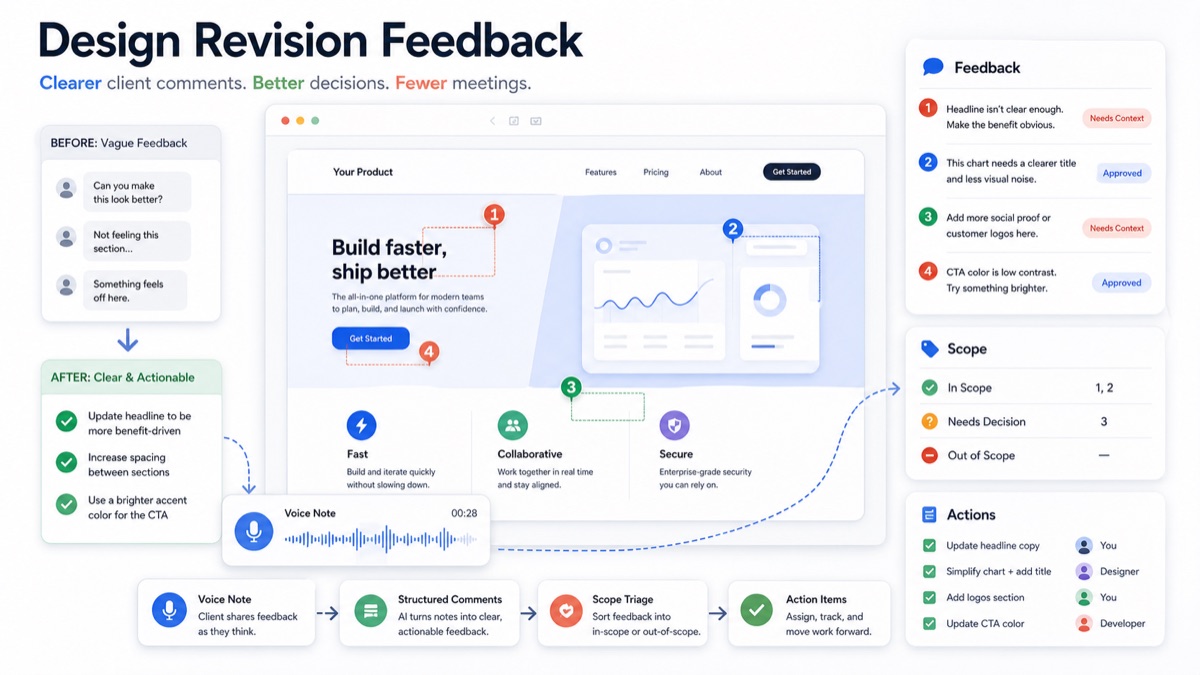
Design revision feedback often sounds simple until the team tries to act on it. A client says the homepage should feel more premium, the layout needs more energy, the headline is not right, or the design is “almost there” but something feels off.
For agencies, freelancers and creative studios, vague comments create revision churn. Designers guess. Project managers ask follow-up questions. Stakeholders add new ideas late. Scope expands quietly because nobody separated approved edits from new requests.
The fix is not asking clients to become designers. The fix is a better feedback workflow that turns client reactions into specific context, decisions, action items and scope labels before the next revision starts.
Design revision feedback is the client input collected during a design review and translated into clear changes, open questions, approvals and scope decisions. Good design revision feedback explains what needs to change, where it applies, why it matters and whether it is in scope.
Quick Answer
To get clearer design revision feedback, ask clients to comment on the specific screen, section or asset they are reviewing, then require context: what feels wrong, what outcome they want, whether the change is required or optional, and who approves it.
The best workflow is to collect client feedback asynchronously, keep comments attached to the design when possible, let clients add voice context when the issue is hard to type, then convert the result into action items and scope labels.
Use this quick triage table:
| Feedback type | Example | What the agency should do |
|---|---|---|
| Clear edit | “Change the CTA text to Book a demo.” | Add an action item |
| Vague reaction | “This section feels weak.” | Ask for business context or a voice explanation |
| Approval note | “The pricing page layout is approved.” | Lock the decision |
| Scope change | “Can we add a comparison calculator?” | Mark as new scope |
| Conflicting feedback | “Sales likes it, founder dislikes it.” | Ask for one decision owner |
For a product-led workflow, combine async client feedback, a voice feedback tool for agencies, client voice notes to action items, and scope creep client intake.
Why Design Revision Feedback Gets Vague
Clients are usually reacting to business risk, not pixels. They may say “make it pop” when they mean:
- the offer is not clear enough;
- the page does not feel credible;
- the CTA does not match the buyer journey;
- the design does not fit the brand;
- a stakeholder has not been heard;
- the work reminds them of a competitor;
- the change they want is actually new scope.
Figma’s guide to comments is useful because comments stay connected to the relevant part of the design. That solves location. It does not always solve meaning.
Figma’s own guidance on giving great feedback also points toward specificity and context. For client work, that context needs to become a repeatable operating system, not a one-off reminder.
A Clear Design Revision Feedback Template
Send this template before every review round.
1 | Design revision feedback |
This template works because it turns subjective comments into decisions the team can act on.
Vague Feedback Vs Actionable Feedback
Use this table to coach clients without sounding defensive.
| Vague client comment | Better follow-up question | Actionable version |
|---|---|---|
| “Make it more premium.” | What would make it feel more credible to your buyer? | Increase spacing, reduce color noise and add enterprise proof near the hero |
| “The page feels too long.” | Which section feels unnecessary or slow? | Shorten the feature section and move proof points above the comparison table |
| “I do not like this headline.” | What promise should the headline make instead? | Rewrite headline around speed of onboarding, not feature breadth |
| “Can we add another section?” | Is this required for launch or a future idea? | Mark as new scope unless required for approval |
| “Something is missing.” | What question would a visitor still have? | Add a short FAQ block below pricing |
Async client feedback helps agencies collect richer revision context without scheduling another meeting.
Raw Client Feedback To Structured Revision Plan
Here is a realistic before-and-after example.
Raw Feedback
1 | The homepage is better, but the top section still does not feel right. The CTA feels too aggressive. The chart section is confusing, and we may need another section about integrations. Also, the founder thinks the customer logos should be higher up. Can we make this feel more enterprise? |
Structured Revision Plan
| Input | Structured output |
|---|---|
| “Top section does not feel right” | Needs context: ask what buyer concern the hero fails to answer |
| “CTA feels too aggressive” | Action item: test softer CTA copy such as “See how it works” |
| “Chart section is confusing” | Action item: simplify chart title and reduce visual noise |
| “Need another integrations section” | Scope decision: confirm whether this is required for launch |
| “Customer logos should be higher” | Action item: move proof closer to hero if approved by decision owner |
| “More enterprise” | Clarification: define enterprise as trust signals, tone, visual restraint or compliance proof |
A feedback-to-action-item workflow turns client comments into assigned tasks, open questions, approvals and scope decisions. That is the difference between another revision round and a controlled revision plan.
Best Workflow For Agencies And Freelancers
Step 1: Send One Review Target
Do not ask for feedback on too many assets at once. Send one design, prototype, page or revision set with a clear review deadline and decision owner.
When the target is broad, feedback becomes broad. When the target is specific, comments become easier to triage.
Step 2: Keep Comments Attached To The Work
Use comments inside the design file for location-specific edits. If the client uses screenshots, email or a project management tool, ask them to include the page, section and goal behind the comment.
This is where async client feedback software and design-file comments can work together. File comments show where the issue is. Voice or written context explains why it matters.
Step 3: Offer Voice For Nuance
Some feedback is hard to write. A client can often explain brand tone, stakeholder tension or buyer confusion faster by voice.
With voice feedback for agencies, the client can explain the revision in their own words. The agency can then turn that explanation into a summary, action items, scope labels and a follow-up email.
Step 4: Triage Before Designers Start
Do not send raw feedback straight to production. First, classify every comment.
| Label | Meaning | Response |
|---|---|---|
| Approved | Client accepts this area | Lock it |
| Edit | Clear in-scope change | Assign it |
| Needs context | Comment is too vague | Ask a follow-up or request voice |
| Needs decision | Stakeholders disagree | Ask decision owner |
| New scope | Request adds deliverables | Price, defer or reject |
| Out of scope | Request conflicts with agreement | Explain boundary |
Scope labels help agencies separate approved revisions from new requests before unpaid work slips into the project.
Step 5: Send A Revision Summary
After triage, send a short summary before work begins:
1 | Thanks for the feedback. Here is how we are treating this revision round: |
This gives the client one clean checkpoint before the team spends time.
When To Use Voice, Comments Or A Meeting
Not every comment needs the same channel.
| Channel | Best for | Avoid when |
|---|---|---|
| Design-file comments | Specific visual edits | The client needs to explain strategy or politics |
| Voice feedback | Nuance, stakeholder context and unclear reactions | The change is a simple typo or copy edit |
| Async written summary | Confirmation and accountability | The issue is still too vague |
| Live meeting | Conflicting stakeholders or high-risk decisions | The goal is just collecting first-pass comments |
Atlassian’s guide to project collaboration reinforces a practical point for distributed teams: collaboration works better when context, decisions and responsibilities are documented. Design feedback needs the same discipline.
Nielsen Norman Group’s article on design critiques is also a useful reminder that critique should evaluate the work against goals instead of personal taste. For client revision rounds, that means connecting comments to the brief, audience or conversion goal.
How VocalJet Fits Design Revisions
VocalJet is useful when clients have more to say than they will type into a comment box.
Instead of scheduling another review call, the agency can ask the client to record a short voice note for unclear feedback. VocalJet helps turn that note into a searchable summary, action items, scope clarification questions and follow-up-ready text.
That makes the workflow practical for:
- design agencies collecting stakeholder comments;
- freelancers managing subjective revision rounds;
- web teams reviewing page sections and landing pages;
- creative studios turning vague reactions into production tasks;
- account managers separating approved edits from new requests.
If the client usually sends Loom videos, a Loom alternative for client feedback can be lighter when the main need is spoken context, summary, search and action items rather than screen recording.
What Not To Do With Design Revision Feedback
Avoid these patterns:
- accepting “make it better” as a production-ready instruction;
- letting every stakeholder comment carry equal weight;
- mixing typos, brand concerns, strategic changes and new deliverables in one task list;
- starting revisions before scope-sensitive requests are classified;
- relying on another meeting when a structured async prompt would solve the issue;
- sending designers raw feedback without a decision owner.
The goal is not to reduce client input. The goal is to make client input usable.
Miro’s guide to asynchronous work is relevant here because async collaboration depends on shared context and clear handoffs. A strong design revision workflow gives each comment a home, a meaning and a next step.
FAQ
What is design revision feedback?
Design revision feedback is client input collected during a design review and translated into clear changes, approvals, open questions, scope decisions and next steps.
How do you ask clients for clearer design feedback?
Ask clients to comment on the exact screen or section, explain what feels unclear, state the outcome they want, and mark whether the change is required for approval or optional.
What should agencies do with vague client comments?
Agencies should pause vague comments before production, ask a follow-up question or request a short voice explanation, then convert the answer into an action item or scope decision.
How can design revision feedback prevent scope creep?
Design revision feedback prevents scope creep when every comment is labeled as approved, in-scope edit, needs decision, new scope or out of scope before the team starts revising.
Can voice notes replace design review meetings?
Voice notes can replace many design review meetings when the client needs to explain nuance asynchronously. Live meetings are still useful when stakeholders disagree or a major decision is blocked.