
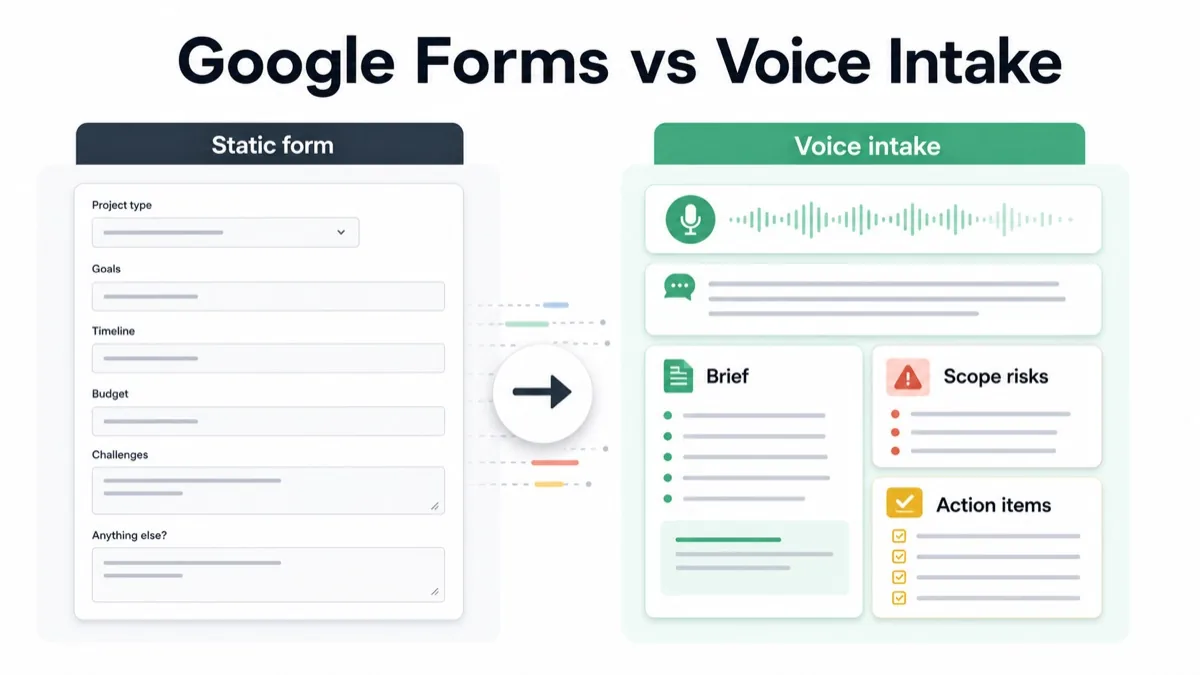
Google Forms is useful when an agency needs structured answers: contact details, budget range, timeline, file links, project type and simple preferences. Voice intake is better when the client needs to explain messy context: why the project matters, what changed, who must approve it, what is uncertain and what could become scope creep.
For agencies, consultants, studios and freelancers, the question is not whether forms are good or bad. The question is whether the intake format captures enough context to write a brief, price the work and start without another clarification call.
Updated 30 October 2026 by Équipe VocalJet. Product descriptions now distinguish recording and transcription from the review, briefs and follow-ups prepared by people.
This guide compares Google Forms and voice intake for client projects, then gives you a decision matrix, hybrid workflow, raw-form-to-voice-brief example, client-ready prompt and FAQ.
Quick Answer
Use Google Forms for simple, structured field collection. Use voice intake when the client needs to explain project context, priorities, constraints, stakeholder concerns or scope uncertainty in their own words.
For agency client intake, the strongest workflow is often hybrid: collect short facts in a form, ask the client to record a short voice response for context, then turn the voice answer into a project brief, scope risks and action items.
Use this decision table:
| Intake format | Best for | Weakness | Best output |
|---|---|---|---|
| Google Forms | Simple fields, links, dates, budget ranges and selections | Thin answers for nuanced context | Intake record |
| Voice intake | Goals, constraints, tradeoffs, hidden stakeholders and uncertainty | Needs structured extraction | Brief, risks and action items |
| Live discovery call | Trust, negotiation or strategic disagreement | Scheduling cost and weak written record | Shared discussion |
| Hybrid intake | Facts first, voice context second | Requires a clear workflow | Shorter follow-up and stronger brief |
What Google Forms Is Best For
Google’s official Forms product page presents Forms as a way to create forms and surveys, collect responses and analyze results. That makes it useful for repeatable intake fields.
Use a form when the answer should be short:
- project type;
- company name;
- website URL;
- contact details;
- target launch date;
- budget range;
- file upload or shared folder link;
- multiple-choice service request;
- yes/no constraints;
- short preference fields.
Google Forms is a good fit when the agency already knows what information it needs and the client can answer with short fields.
The problem starts when the form becomes a substitute for discovery. A client may type “website redesign” in a project type field, but that does not explain why the redesign matters, what internal pressure caused it, which stakeholder will block approval or which request is actually out of scope.
See the Google Forms capability comparison for the documented form features and a workflow that keeps structured answers alongside a separate voice link.
What Voice Intake Is Best For
Voice intake is best when the client has context but does not know how to structure it.
Voice client intake is a workflow where clients explain project context asynchronously by voice, then the agency turns that recording into structured goals, constraints, risks and next steps.
Use voice intake when you need to understand:
- why the project matters now;
- what success should look like;
- what is not working today;
- which assumptions need confirmation;
- who gives feedback and final approval;
- what could delay the work;
- which ideas are phase one vs later;
- what “simple” or “quick” really means.
A reviewed intake brief records goals, constraints, risks and next steps. Your team writes it from the answers, transcript and supporting project records, keeping assumptions separate from confirmed requirements.
The voice intake qualification method focuses on understanding the reason behind a request before choosing a solution.
Google Forms vs Voice Intake Decision Matrix
Use this matrix before choosing an intake flow.
| Client intake need | Google Forms | Voice intake | Why |
|---|---|---|---|
| Collect contact details | Yes | No | Short factual field |
| Capture a budget range | Yes | Maybe | Structured selection |
| Understand why the project matters | Maybe | Yes | Narrative context |
| Clarify stakeholders | Maybe | Yes | Hidden politics and approval risk |
| Collect files or links | Yes | No | Form fields are enough |
| Separate included vs future scope | Maybe | Yes | Needs explanation and follow-up |
| Build a project brief | Maybe | Yes | Needs structured interpretation |
| Reduce discovery calls | Maybe | Yes | Async context can replace part of the call |
The practical rule: use forms for facts and voice for context.
If you add a voice route, follow the voice invitation setup rather than promising an audio field or synchronization inside the form.
Best Workflow For Agencies
Step 1: Use A Form For Short Facts
Keep the form short. Do not ask clients to write a full strategy brief inside a long text box.
1 | Client intake form fields |
This gives the agency a clean intake record without pretending the form can capture everything.
Step 2: Ask For A Voice Context Answer
After the short form, ask for one voice response.
1 | Please record a short voice note explaining: |
This prompt works because it lets the client speak naturally while still guiding them toward useful project context.
Step 3: Convert The Voice Answer Into A Brief
Asana’s guide to a project brief is useful because it puts the project goals, scope, audience, timeline and ownership in one written home.
Do not leave the voice answer as a transcript only. Convert it into a brief.
| Voice answer signal | Brief section |
|---|---|
| “Sales keeps answering the same questions” | Business problem |
| “The service page matters most” | Priority deliverable |
| “Leadership will want to review the positioning” | Approval risk |
| “We might add a comparison page later” | Scope decision |
| “We have screenshots but not final copy” | Asset dependency |
Client intake is only useful when the output can guide pricing, planning and delivery.
Step 4: Run A Scope Check
Before proposal or kickoff, separate five things.
| Category | Meaning | Example |
|---|---|---|
| Confirmed requirement | Clearly requested and included | Service page redesign |
| Assumption | Likely true but not confirmed | Client provides final copy |
| Dependency | Needed before work moves | Brand assets and CMS access |
| Open question | Needs decision | Is comparison page included? |
| New request | Outside the current scope | Additional landing page |
Atlassian’s project kickoff play focuses on alignment around purpose, roles, responsibilities and success markers. For agencies, this alignment starts during intake, not after the project is already underway.
Step 5: Turn Intake Gaps Into Action Items
Use a table after every intake review.
| Intake gap | Action item | Owner |
|---|---|---|
| Comparison page unclear | Confirm whether comparison page is phase one or future scope | Client |
| Final copy missing | Name content owner and delivery date | Client |
| Approval path unclear | Identify final approver | Client |
| CMS access missing | Share access or vendor contact | Client |
| Scope risk found | Send phase-one recommendation and optional add-on | Agency |
Client notes to action items is the workflow of turning raw client context into tasks with owners, deadlines and scope impact.
Use the agency intake handoff to assign the review of both responses and resolve conflicting facts before delivery receives the brief.
Raw Form Answer To Voice Intake Output
Here is how the difference looks in practice.
Thin Form Answer
1 | Project type: Website redesign |
Voice Intake Summary
1 | The current website is causing sales friction because prospects do not understand the service packages. The client wants the service page and homepage clarified before a Q3 campaign. Sales and leadership both need to review the messaging. The client has screenshots and some rough copy, but no final positioning yet. A comparison page is interesting but should be treated as optional unless it fits the budget. |
Structured Agency Output
| Section | Structured output |
|---|---|
| Business goal | Reduce sales friction before the Q3 campaign |
| Priority deliverables | Homepage and service page clarification |
| Stakeholders | Sales and leadership review messaging |
| Assets | Screenshots and rough copy exist; final positioning is missing |
| Scope risk | Comparison page may be new scope |
| Client action items | Confirm positioning owner, final approver and comparison page priority |
| Agency action items | Prepare phase-one brief and optional comparison-page estimate |
The form answer is not useless. It is just incomplete. Voice intake gives the agency the story behind the fields.
Apply the transcript-to-brief review yourself: confirm what the client actually said and label information still needed.
When Google Forms Is Better Than Voice Intake
Choose Google Forms when the intake is mostly structured.
| Use Google Forms when | Why |
|---|---|
| You need repeatable answers | Easier to standardize |
| The answers are short | Forms are fast |
| You need links, files or selections | Fields are clear |
| The project type is simple | No narrative needed |
| The client is providing admin details | Voice would slow it down |
Forms are not the problem. Overloading forms with questions that require nuance is the problem.
When Voice Intake Is Better Than Google Forms
Choose voice intake when the project has ambiguity.
| Use voice intake when | Why |
|---|---|
| The client gives vague goals | Voice captures context |
| The request may affect scope | Spoken nuance reveals risk |
| Stakeholders are hidden | Client can explain politics |
| The brief is incomplete | Voice adds narrative |
| Another call feels unnecessary | Async voice reduces scheduling |
Scope clarification questions help agencies separate requested deliverables from assumptions before proposal or kickoff. Voice intake gives clients a faster way to answer those questions in their own words.
How VocalJet Fits This Workflow
VocalJet is useful when a client intake form gives you the facts but not enough context to start work.
Offer a voice response when the client needs to explain an answer. VocalJet records and transcribes that explanation. Your team checks the text, writes the brief, identifies missing decisions and prepares the follow-up. Keep Google Forms for fields that already capture the information clearly.
That makes VocalJet a strong fit when:
- form answers are too short;
- the client needs to explain nuance;
- the agency needs a brief before proposal;
- scope risk is hidden inside vague language;
- the next step should become action items.
Voice intake is not a replacement for every form field. It is the context layer that makes form data useful for client work.
For a recording that includes several immediate requests, the voice-note action review helps separate possible tasks from questions before you copy them into your project system.
FAQ
Is Google Forms good for client intake?
Google Forms is good for collecting structured client intake details such as contact information, project type, budget range, timeline, links and files. It is weaker when the client needs to explain project context, tradeoffs or scope risk.
When should an agency use voice intake instead of Google Forms?
An agency should use voice intake when a client request is vague, strategic, stakeholder-heavy or likely to affect scope. Voice helps the client explain context that would be too thin in a form field.
Can Google Forms and voice intake work together?
Yes. A strong hybrid workflow uses Google Forms for short facts and voice intake for the story behind those facts. The agency then turns the voice response into a brief, scope risks and action items.
What should a voice intake prompt ask?
A voice intake prompt should ask what the client wants to achieve, why it matters now, what is not working, what must be included, what might be later, who approves the work and what could delay the project.
How does voice intake reduce scope creep?
Voice intake reduces scope creep by exposing assumptions, optional ideas, hidden stakeholders, missing assets and unclear priorities before proposal or kickoff. Those signals can then be labeled as included, excluded, dependent or new scope.
How can VocalJet help agencies replace long intake forms?
VocalJet lets clients explain project context by voice and provides a transcript. The agency reviews the source, writes the intake brief and confirms the remaining questions. Structured forms may still be preferable for consistent fields and reporting.