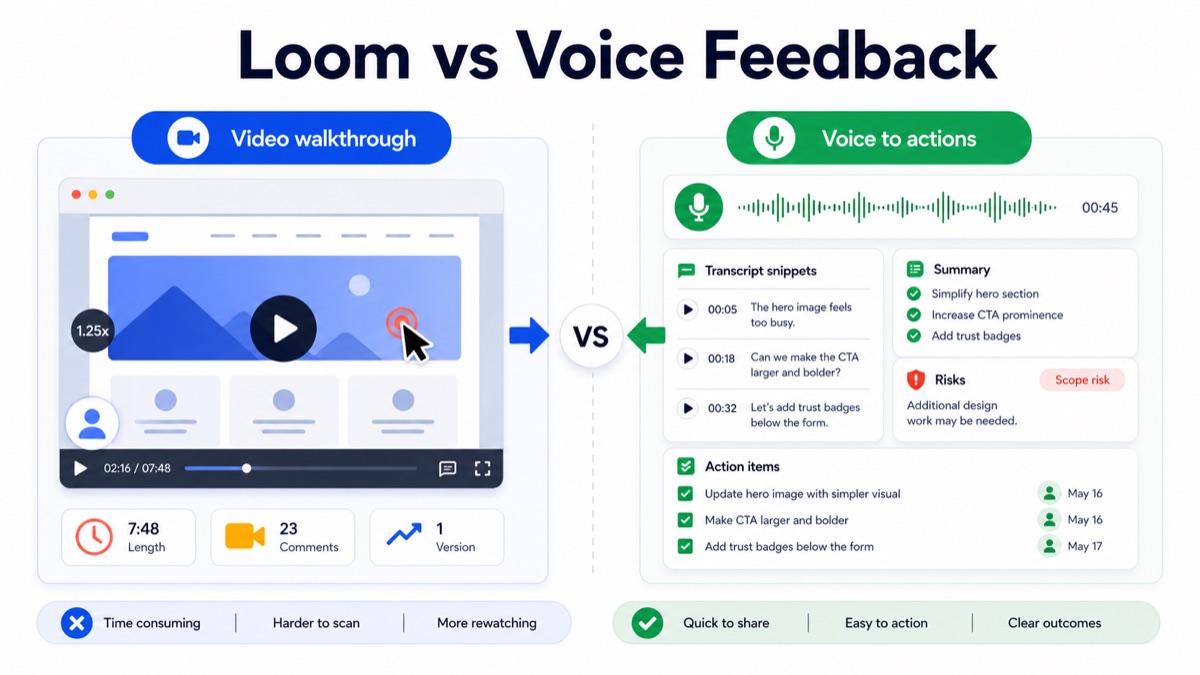
Loom and voice feedback both help clients explain revision context asynchronously. The difference is the output. A Loom-style screen recording is useful when the client must show a visual issue on screen. Voice feedback is better when the agency needs the client’s reasoning, priorities, scope signals and next steps in a format the team can scan quickly.
For agencies, consultants, studios and freelancers, the question is not “video or audio?” The question is: which format creates clearer revision decisions without forcing the team to rewatch long recordings?
This guide compares Loom-style video walkthroughs with async voice feedback for client revisions, then gives you a decision matrix, feedback routing workflow, raw-feedback-to-action-items example and client-ready prompt.
Quick Answer
Use Loom or another screen recorder when the client needs to show exactly where something happens on a page, design, prototype or interface. Use voice feedback when the client needs to explain why something feels wrong, what should change, what matters most and whether the request affects scope.
For client revisions, the best workflow is often hybrid: keep visual comments attached to the asset, collect voice feedback for context, then turn the feedback into action items, scope labels and a follow-up summary.
Use this decision table:
| Feedback format | Best for | Weakness | Best output |
|---|---|---|---|
| Loom-style video walkthrough | Showing a screen, bug, page section or visual path | Harder to scan and rewatch | Visual walkthrough |
| Written comments | Precise notes tied to a design or document | Often too short for context | Asset-level comments |
| Voice feedback | Explaining reasoning, priority, tone and tradeoffs | Needs structured extraction | Summary, risks and action items |
| Live meeting | Conflict, strategy decisions or stakeholder disagreement | Scheduling cost and weak record | Shared alignment |
For product-led revision workflows, connect a Loom alternative for client feedback, voice feedback for agencies, async client feedback, an async client feedback tool, and client voice notes to action items.
What Loom Is Best For
Loom’s official screen recorder page positions the product around recording your screen and camera. That is useful for client revisions when the client needs to show what they see.
Use a screen recording when the visual path matters:
- a layout issue appears only after scrolling;
- a website interaction is confusing;
- the client wants to show a specific section;
- a bug depends on sequence or timing;
- the reviewer needs to compare the design against a live page;
- the screen itself carries the context.
Screen recordings are strong when the team needs visual evidence. They are weaker when the team needs a clean list of decisions, scope changes and next steps.
A seven-minute video can include one useful insight and six minutes of searching, hesitation or repeated comments. That is not a client problem. It is a workflow problem: video is easy to record, but not always easy to operationalize.
What Voice Feedback Is Best For
Voice feedback is best when the client needs to explain context without sharing a screen.
Voice feedback for client revisions is an async workflow where the client records spoken comments, then the team turns that recording into a transcript, summary, scope labels and action items.
Use voice feedback when the client needs to explain:
- why the design does not feel right;
- which message should be more prominent;
- which stakeholder is concerned;
- whether a request is a revision or new scope;
- what priority should guide the next round;
- what decision should happen before delivery continues.
Async client feedback helps agencies collect richer revision context without scheduling another meeting. The value is not only the audio. The value is converting spoken context into structured work.
Loom vs Voice Feedback Decision Matrix
Use this matrix before asking a client for feedback.
| Client feedback need | Use Loom-style video | Use voice feedback | Use comments |
|---|---|---|---|
| “Show me exactly where this happens” | Yes | Maybe | Yes |
| “Explain why this does not feel right” | Maybe | Yes | Maybe |
| “Mark one small change on a design” | Maybe | No | Yes |
| “Discuss stakeholder concerns” | No | Yes | Maybe |
| “Report a bug or interaction issue” | Yes | Maybe | Maybe |
| “Turn feedback into tasks quickly” | Maybe | Yes | Maybe |
| “Check whether this is out of scope” | No | Yes | No |
| “Review a long page section by section” | Yes | Maybe | Yes |
The practical rule is simple: use video when the screen is the source of truth, and use voice when client reasoning is the source of truth.
Best Workflow For Agencies And Creative Teams
Step 1: Keep Visual Feedback Attached To The Asset
If the client is commenting on a design file, web page or prototype, start by keeping precise comments close to the work.
Figma’s official comments guide is useful because comments stay tied to the relevant area of a file. That matters for visual precision.
But visual precision is not the same as decision clarity. A comment that says “make this pop” still needs context.
Step 2: Ask For Voice When The Comment Needs Context
Use a short prompt instead of asking for a long video:
1 | Please record a short voice note explaining: |
This gives the client a natural way to explain nuance without forcing the team to decode a long video.
Step 3: Convert Feedback Into Action Items
Asana’s guide to action items reinforces the important operational point: next steps need clear ownership and action.
After each revision round, convert feedback into this structure:
| Feedback signal | Action item | Scope label |
|---|---|---|
| “The hero feels too busy” | Simplify hero visual and reduce competing elements | Included revision |
| “Can the CTA be bigger?” | Increase CTA prominence and confirm button hierarchy | Included revision |
| “Could we add trust badges?” | Confirm whether trust badge design is included or new scope | Scope check |
| “Legal wants another disclaimer” | Ask client to provide approved disclaimer copy | Dependency |
| “Maybe add a comparison section” | Treat as optional add-on unless already scoped | New request |
Client feedback to action items is the workflow of turning revision comments into tasks, owners, decisions and scope signals.
Step 4: Send A Revision Summary
Do not let the next revision start from a video link alone. Send a written summary.
1 | Thanks for the feedback. Here is what I captured: |
This is where voice feedback becomes useful for delivery. It gives the team a written record and gives the client one clean chance to correct the interpretation.
Raw Video-Style Feedback To Structured Output
Here is a realistic before-and-after.
Raw Client Feedback
1 | I recorded a walkthrough because the homepage feels close, but something is off. The hero looks a bit busy, and I think the CTA should stand out more. Around the pricing section, can we add some trust badges or maybe a small comparison area? Also, our legal person might want a short disclaimer below the form. |
Structured Revision Output
| Section | Structured output |
|---|---|
| Main issue | Homepage feels close but visually busy |
| Confirmed action | Simplify hero section and make CTA more prominent |
| Scope risk | Trust badges and comparison area may be new design/content work |
| Dependency | Legal disclaimer copy needs client/legal input |
| Open question | Are trust badges included in this revision or a future add-on? |
| Client action | Confirm trust badge scope and provide legal copy |
| Agency action | Update hero hierarchy and CTA treatment |
| Follow-up | Send revision summary before design work continues |
This is why the output matters more than the input format. Whether the client starts with video, comments or voice, the delivery team needs a revision plan.
When Loom Is Better Than Voice Feedback
Choose a screen recording when the client needs to show a visual path or interaction.
| Use Loom-style video when | Why |
|---|---|
| The issue is hard to describe without showing the screen | Visual proof matters |
| The feedback involves scrolling, clicking or timing | Sequence matters |
| The client is reviewing a live website or app | Screen context matters |
| The team needs to reproduce a bug | Observation matters |
| The client wants to compare two visual states | Side-by-side viewing matters |
Video is not the enemy of async feedback. It is just the wrong default when the main issue is reasoning, priority or scope.
When Voice Feedback Is Better Than Loom
Choose voice feedback when the client needs to explain decisions and tradeoffs.
| Use voice feedback when | Why |
|---|---|
| The client has subjective feedback | Tone and reasoning matter |
| The request may affect scope | Scope labels matter |
| Stakeholder context is hidden | Background matters |
| The team needs a fast summary | Scanability matters |
| The next step should become tasks | Action items matter |
Miro’s guide to asynchronous work is a useful reminder that async collaboration needs clear context and shared visibility. Voice feedback works best when the spoken context becomes a shared written record.
How VocalJet Fits This Workflow
VocalJet is not a full screen-recording replacement. It is a better fit when the client does not need to show the screen and the agency needs structured feedback outputs.
With VocalJet, the client can leave async voice feedback without creating another meeting. The agency gets a transcript, summary, scope risks, action items and follow-up-ready text.
That makes VocalJet useful when:
- a Loom video would be too long to rewatch;
- the client needs to explain why a revision matters;
- feedback should become tasks quickly;
- the agency needs to spot scope creep;
- the team wants a cleaner follow-up email after feedback.
Voice feedback is not “audio instead of video.” It is spoken client context turned into structured revision work.
FAQ
Is Loom better than voice feedback for client revisions?
Loom is better when the client needs to show a screen, interaction, bug or visual path. Voice feedback is better when the client needs to explain reasoning, priority, stakeholder context or scope impact.
Can voice feedback replace Loom?
Voice feedback can replace Loom when screen recording is not necessary. It should not replace Loom when the team needs visual proof, a click path or a screen walkthrough.
What is the best way to collect async client feedback?
The best async client feedback workflow keeps precise visual comments attached to the asset, collects voice feedback for context, then converts the feedback into action items, scope labels and a follow-up summary.
Why are long feedback videos hard for agencies?
Long feedback videos are hard because the team may need to rewatch them, extract decisions manually and separate real action items from commentary. A structured summary makes the feedback easier to use.
How do you turn client feedback into action items?
Turn client feedback into action items by extracting the requested change, owner, deadline, dependency and scope label. Then send the client a confirmation summary before the next revision starts.
How can VocalJet help with client voice feedback?
VocalJet lets clients record voice feedback asynchronously, then helps turn the recording into a transcript, summary, scope risks, action items and follow-up-ready response text.