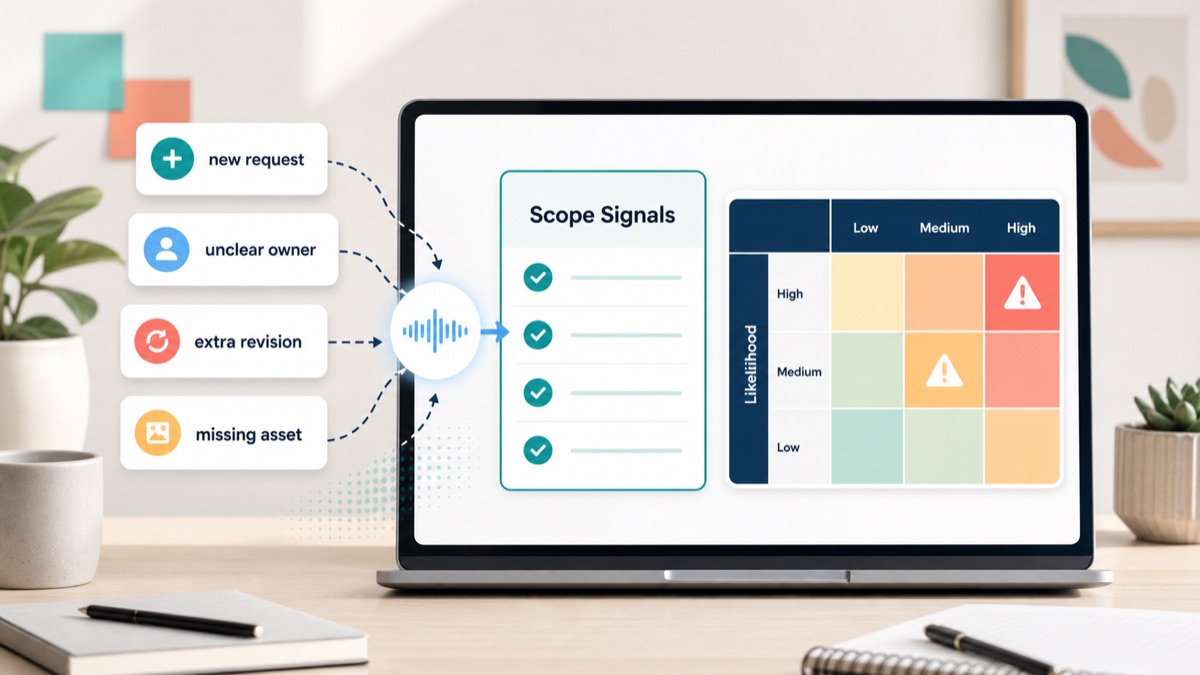
Client feedback is where scope creep often becomes visible. The client may not say “we want new scope.” They say “while you are in there,” “can we also,” “one more option,” “our CEO just had a thought,” or “this should be quick.”
For agencies, consultants, creative studios and freelancers, those comments are not automatically bad. Some are valid clarifications. Some are included revisions. Some are new work. The expensive mistake is treating every client comment as a normal revision before the team has checked ownership, deliverables, dependencies and approval impact.
This guide gives you a scope creep warning-sign framework for client feedback, a triage table, a before-and-after example, response scripts and a workflow for turning messy feedback into decisions, action items and clean follow-up.
Quick Answer
Scope creep warning signs in client feedback are comments that add deliverables, expand approvals, change priorities, introduce new stakeholders, depend on missing client inputs, or ask for extra revision rounds beyond the original agreement.
Client feedback becomes scope risk when it changes the work your team agreed to deliver, the time needed to deliver it, or the person responsible for approving it. The goal is not to reject feedback. The goal is to label each comment before the team starts work.
Use this quick triage table:
| Client feedback signal | Likely category | Best next step |
|---|---|---|
| “Can we also add…” | New request | Estimate or move to next phase |
| “One more version would help” | Extra revision | Check included revision rounds |
| “Leadership wants to review” | Approval risk | Name one decision owner |
| “We do not have the copy yet” | Dependency | Assign client action item |
| “Make it more strategic” | Unclear scope | Ask what output should change |
| “This should be quick” | Assumption risk | Confirm effort before committing |
For a product-led workflow, connect async client feedback, an async client feedback tool, voice feedback for agencies, scope creep client intake, and client voice notes to action items.
Why Scope Creep Shows Up During Feedback
Feedback is a natural place for clients to discover what they really want. Once they see a design, draft, strategy, report or prototype, they may notice gaps that were invisible during intake.
Atlassian’s scope creep guide connects scope creep to project boundaries changing over time. In client service work, those changing boundaries often arrive as harmless-sounding feedback.
The problem is not that clients ask for changes. The problem is that agencies often respond to every comment with “sure” before deciding whether it is:
- an included revision;
- a clarification of the original brief;
- a client-owned dependency;
- a stakeholder approval issue;
- an out-of-scope request;
- a change request that needs budget or timeline.
Scope creep warning signs are the signals inside client feedback that a comment may change deliverables, responsibilities, approvals, timeline or price.
Scope Creep Warning Signs Checklist
Use this checklist before assigning revision tasks.
| Warning sign | What it sounds like | Why it matters | Response |
|---|---|---|---|
| New deliverable | “Can we add a comparison section?” | Adds work not in the original scope | Confirm whether it is included or an add-on |
| Extra version | “Can we see three more options?” | Expands revision volume | Check revision limits |
| Hidden stakeholder | “The CEO wants to weigh in” | Adds approval churn | Name the decision owner |
| Missing client input | “We will send copy later” | Blocks timeline | Assign client-owned action item |
| Strategy expansion | “Can you make it more strategic?” | May add consulting work | Define the expected output |
| Platform dependency | “Our dev team will handle it eventually” | Creates implementation risk | Clarify ownership and deadline |
| Late priority shift | “Actually, lead gen matters more now” | Changes success criteria | Update brief before revision work |
| Ambiguous urgency | “Can this be done by Friday?” | Compresses timeline without scope tradeoff | Confirm what gets removed or paid |
This is the practical difference between feedback management and scope management. Feedback management collects comments. Scope management decides what each comment means for work, ownership and approval.
Feedback Signal Decision Table
Before you move a client comment into production, route it through this decision table.
| Question | If yes | If no |
|---|---|---|
| Was this deliverable included in the original scope? | Treat as revision or clarification | Mark as scope check |
| Does it change the number of assets, pages, concepts or rounds? | Estimate impact | Continue triage |
| Does it require new client input or approval? | Assign client action item | Continue triage |
| Does it change the business goal or priority? | Update the brief | Treat as execution feedback |
| Does it affect timeline, budget or resourcing? | Use change request language | Treat as normal revision |
| Can the team act without another conversation? | Convert to action item | Ask a focused clarification question |
Asana’s change control process guide frames change control as a structured way to submit, review and approve project changes. Agencies do not need enterprise bureaucracy for every small revision, but they do need a lightweight version of that logic when client feedback expands the agreed work.
Raw Client Feedback To Scope-Risk Output
Here is a realistic before-and-after.
Raw Client Feedback
1 | The page is getting closer. Can we make the hero more premium and add a short comparison section below pricing? Also, leadership wants to see a few different CTA directions before we decide. We still need to send updated customer quotes, but maybe you can use placeholders for now. If possible, can we get this ready by Friday? |
Structured Scope-Risk Output
| Feedback item | Category | Owner | Next step |
|---|---|---|---|
| Make hero more premium | Included revision if visual direction was scoped | Agency | Define what “premium” means before editing |
| Add comparison section | New deliverable | Client/agency | Confirm add-on, defer, or replace another section |
| Leadership wants CTA options | Approval and revision risk | Client | Name one final decision owner and version limit |
| Updated customer quotes missing | Client dependency | Client | Provide approved quotes by a specific date |
| Use placeholders | Assumption risk | Agency/client | Confirm placeholder use will not trigger another round |
| Ready by Friday | Timeline risk | Both | Confirm tradeoff, paid rush, or revised due date |
Follow-Up Summary
1 | Thanks for the feedback. Here is how I am reading it: |
This is the moment where an agency protects the relationship. The response is not defensive. It is specific, operational and easy for the client to approve.
The Scope Label Rubric
Label every feedback item before assigning the work.
| Label | Meaning | Example | Team action |
|---|---|---|---|
| Included revision | Fits the agreed deliverable and revision round | “Tighten hero copy” | Assign to team |
| Clarification needed | Intent is unclear | “Make this feel more mature” | Ask one focused question |
| Client dependency | Client must provide input | “Use our new legal language” | Assign to client |
| Scope check | May add work | “Add a new page” | Confirm included vs add-on |
| Change request | Changes budget, timeline or deliverables | “Add a campaign package” | Estimate and approve |
| Approval risk | Adds or changes decision makers | “Board wants to review” | Name final approver |
Client feedback to action items is the workflow of turning comments into tasks, owners, dependencies, deadlines and scope labels. Without labels, vague comments become invisible project risk.
Asana’s action items guide reinforces the operational point: useful next steps need clear ownership and action. In client feedback, ownership matters because not every action item belongs to the agency.
Best Workflow For Agencies, Consultants And Freelancers
Step 1: Collect Feedback Asynchronously
Start by collecting feedback in a format the client can actually complete. Written comments are useful for exact edits. Voice feedback is useful when the client needs to explain reasoning, stakeholder context or tradeoffs.
Async client feedback helps agencies collect richer revision context without scheduling another meeting. The key is to turn the feedback into structured output before work starts.
If the client thinks better out loud, use voice feedback for agencies. The client can explain what feels off, why it matters and what outcome they want.
Step 2: Preserve The Raw Feedback
Do not rewrite feedback too early. Keep the original comment, voice note or transcript attached to the revision round.
GitLab’s asynchronous communication handbook is useful because it treats written context as a way to reduce ambiguity in distributed work. Client feedback needs the same habit: keep the raw source, then summarize the decision.
Step 3: Extract Actions, Dependencies And Scope Labels
For each feedback item, extract:
- requested change;
- deliverable affected;
- owner;
- dependency;
- approval owner;
- deadline;
- scope label;
- follow-up question.
This is where VocalJet fits the workflow. A client can leave a voice note, and the team can use VocalJet to turn it into a transcript, summary, action items, scope risks and follow-up-ready text.
Step 4: Ask Only The Missing Questions
Avoid turning every unclear comment into another meeting. Ask the smallest question that unlocks the next step.
1 | Quick scope check before we revise: |
This keeps momentum without silently expanding the project.
Step 5: Send A Feedback Confirmation Email
Before the next revision round starts, send a written confirmation.
1 | Thanks for the feedback. Here is the working revision plan: |
This gives the client a clean chance to correct your interpretation before the team spends time.
When To Escalate Feedback Into A Change Request
Not every scope signal needs a formal change request. But some feedback should not be handled as a casual comment.
Escalate when the feedback:
- adds a new deliverable;
- changes the number of included revision rounds;
- requires a new stakeholder approval path;
- changes the launch date without removing work;
- introduces new tools, vendors, pages, assets or platforms;
- changes the core business goal after work has started;
- requires specialist work not included in the original agreement.
A change request does not need to sound harsh. It can be simple:
1 | That is a good addition, but it is outside the current revision scope. I can either: |
The best scope creep response gives the client a decision, not a surprise.
How VocalJet Fits This Workflow
VocalJet is useful when client feedback contains nuance that is hard to capture in short comments. The client records feedback in their own words. The agency turns the voice note into a transcript, summary, scope labels, action items and a follow-up email.
Use VocalJet when:
- feedback is too vague for the team to act on;
- the client wants to explain context without another meeting;
- the agency needs to detect scope risk before revising;
- stakeholders are adding comments across email, calls and documents;
- the team needs a clean written record after spoken feedback.
Voice feedback is not just audio collection. In a client workflow, voice feedback becomes useful when it is converted into scope clarity, action items and confirmation text.
FAQ
What are scope creep warning signs in client feedback?
Scope creep warning signs in client feedback are comments that add deliverables, extra revision rounds, new stakeholders, missing dependencies, changed priorities or timeline pressure beyond the original agreement.
Is every client change request scope creep?
No. Some changes are normal included revisions or clarifications. A change becomes scope risk when it affects deliverables, budget, timing, approval path or responsibility.
How should agencies respond to vague feedback?
Agencies should preserve the raw feedback, label the risk, ask the smallest useful clarification question, and send a written summary before starting revision work.
How do you prevent scope creep during client revisions?
Prevent scope creep during client revisions by separating included revisions from new requests, assigning client dependencies, naming approval owners and confirming any timeline or budget impact in writing.
Can voice feedback help reduce scope creep?
Voice feedback can reduce scope creep when the recording is converted into a transcript, summary, action items and scope labels. Raw audio alone does not prevent scope creep.
When should feedback become a change request?
Feedback should become a change request when it adds new deliverables, extra rounds, new stakeholders, new platforms, new deadlines or work that was not included in the original scope.