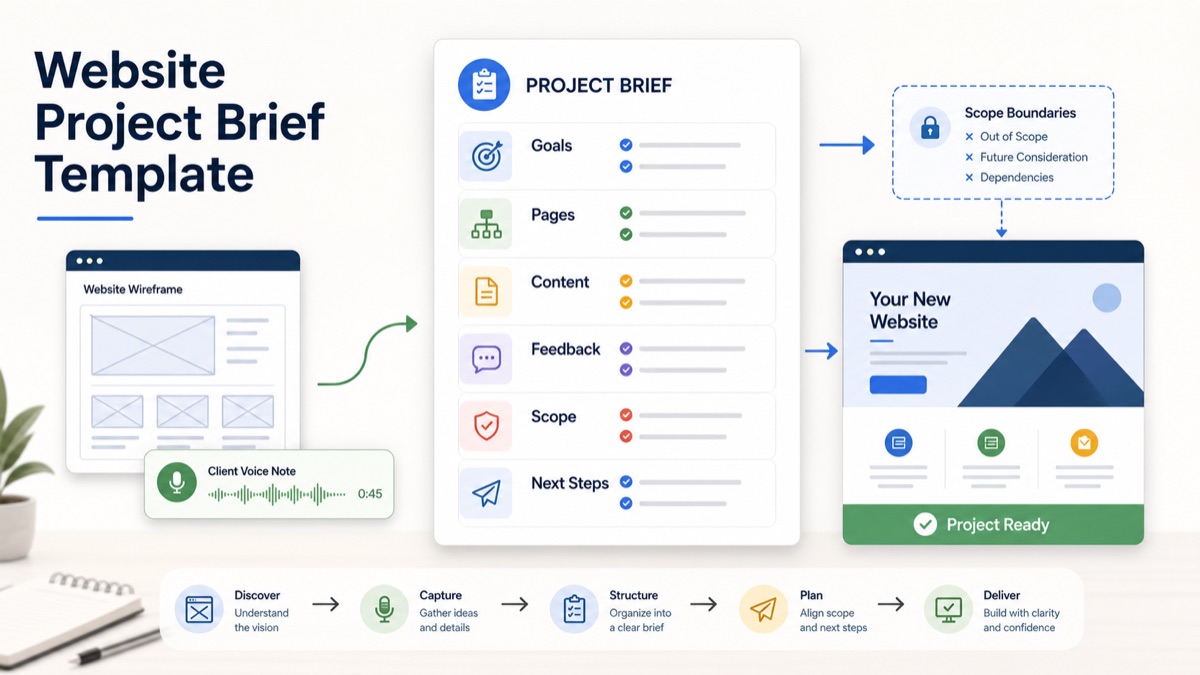
A website project brief should protect the project before design starts. For web design agencies, freelancers and creative studios, the risk is rarely that the client has no opinion. The risk is that the client has scattered opinions, incomplete content, unclear stakeholders and hidden expectations that only appear after the first mockup.
This guide is for client-facing teams that need a practical way to collect website context, turn it into a usable brief, and separate confirmed scope from assumptions before proposal, kickoff or revision rounds.
A website project brief template is a structured intake document that captures the client’s website goals, audience, pages, content, design references, technical constraints, approval process, scope boundaries and next steps. The best template does not just ask questions. It turns client context into a plan the agency can quote, design, build and defend.
Quick Answer
A website project brief should include the business goal, target audience, priority pages, required content, design direction, technical constraints, stakeholders, timeline, approval process, exclusions and open questions. For agencies and freelancers, the brief should also mark scope risks before work begins.
The simplest workflow is to collect the client’s raw context first, then convert it into a structured brief. A typed form works when the client already knows the details. A voice client intake workflow works better when the client needs to explain goals, content gaps, stakeholders or constraints in their own words.
Use this quick decision table before choosing an intake method:
| Intake method | Best for | Main weakness | Best output |
|---|---|---|---|
| Static form | Known requirements and small updates | Clients skip nuance | Fielded answers |
| Discovery call | Complex strategy and high-trust sales | Expensive to schedule and summarize | Conversation notes |
| Voice intake | Messy context, multiple stakeholders and async review | Needs structured extraction | Brief, scope questions and next steps |
| Email thread | Simple clarifications | Context gets buried | Follow-up recap |
For a product-led workflow, combine client intake software for agencies, a voice intake form, an AI client brief generator, scope creep client intake and client voice notes to action items.
What A Website Project Brief Should Clarify
A website brief is not a mood board and it is not a contract. It is the operating summary that tells the agency what the client wants, why it matters and what still needs confirmation.
Asana’s guide to a project brief frames a brief as a concise place for goals, scope, timeline and audience. That definition is useful for web design, but client projects need a sharper version because design, content, development and approvals can all create scope drift.
At minimum, a website project brief should clarify:
| Brief section | What to capture | Why it matters |
|---|---|---|
| Business goal | What the site should change for the business | Prevents design without a target |
| Audience | Who the site must persuade or support | Guides copy, structure and UX |
| Website type | Marketing site, landing page, ecommerce, portal or redesign | Shapes deliverables |
| Page list | Required pages and priority sections | Controls production scope |
| Content ownership | Who writes, approves and supplies assets | Prevents launch delays |
| Brand direction | Existing guidelines, references and preferences | Reduces subjective revisions |
| Technical constraints | CMS, integrations, forms, analytics and hosting | Avoids late feasibility issues |
| Stakeholders | Who gives input and who approves | Prevents review chaos |
| Timeline | Desired launch date and real dependencies | Separates urgency from feasibility |
| Scope boundaries | Inclusions, exclusions and change rules | Protects margin |
Scope clarification questions help agencies separate requested deliverables from assumptions before proposal or kickoff.
Website Project Brief Template
Use this template before quoting a website build, redesign or landing page project.
1 | Website project brief |
This template is intentionally operational. It gives the web team enough context to plan pages, content, design, build work, feedback and client responsibilities.
Questions To Ask Web Design Clients
Do not ask every possible question. Ask the questions that change scope, timeline or decision quality.
| Question | What it reveals | Scope risk if unclear |
|---|---|---|
| What is the main business reason for the website project? | Goal and priority | The project becomes visual preference only |
| Which pages are required for launch? | Production volume | New pages appear after design starts |
| Who owns copy and images? | Content dependency | Launch stalls while the agency waits |
| Who has final approval? | Decision path | Multiple stakeholders create revision loops |
| What systems must the site connect to? | Technical work | Integrations become surprise deliverables |
| What is not included in this project? | Boundaries | Client assumes ongoing work is included |
| How should feedback be sent? | Review workflow | Comments scatter across calls, email and tools |
Atlassian’s project kickoff guidance emphasizes aligning on purpose, roles, responsibilities and success markers. A website brief should do the same before the kickoff, so the kickoff can confirm the plan instead of discovering basic requirements.
Raw Client Notes To Structured Website Brief
Here is a realistic transformation.
Raw Client Notes
1 | We need the site to feel more premium. The current one is outdated and people keep asking what we actually do. We probably need a homepage, services pages and maybe a case studies section. Sales wants better lead quality. The founder wants it live before the conference in September. We have some copy in Google Docs but it is not final. We use HubSpot, and the contact form should send leads there. We like clean SaaS sites, not too playful. Also, can you help with SEO and maybe write the copy? |
Structured Website Brief
| Section | Structured output |
|---|---|
| Business goal | Improve positioning and generate higher-quality leads |
| Website type | Marketing website redesign |
| Audience | Prospects who do not currently understand the offer |
| Required pages | Homepage, services pages, possible case studies |
| Content status | Draft copy exists but is not final |
| Technical requirement | Contact form should connect to HubSpot |
| Design direction | Premium, clean SaaS feel, not playful |
| Timeline | Desired launch before September conference |
| Scope risk | SEO and copywriting are mentioned but not confirmed as included |
| Open questions | How many services pages? Are case studies included? Who writes final copy? What HubSpot fields are required? What does “better lead quality” mean? |
| Next step | Send confirmation summary and clarify copy, SEO, page count and integration scope |
An AI client brief generator turns spoken or written client context into structured goals, constraints, risks and next steps. That matters because the raw note contains useful context, but it also hides several assumptions that could become unpaid work.
Best Workflow For Agencies And Freelancers
Step 1: Collect Client Context Before The Call
Send the client one intake link before discovery or proposal. Ask them to explain the website problem, goal, audience, pages, content status, stakeholders and timeline.
If they hate forms or need to think out loud, use async voice. Voice client intake is a workflow where clients explain project context asynchronously by voice. The recording becomes a structured brief instead of another call transcript.
Step 2: Convert The Intake Into A Brief
Use the template above to sort the client’s answer into confirmed facts, assumptions, open questions and scope risks.
Do not let the intake remain as raw audio, a transcript or a long email thread. The value is the structured output.
Step 3: Mark Scope Risks
For website projects, the most common scope risks are:
- undefined page count;
- copywriting assumed but not priced;
- content migration assumed but not discussed;
- custom integrations hidden behind “simple form”;
- SEO, analytics or accessibility work added late;
- multiple stakeholders giving unstructured feedback;
- launch date chosen before assets are ready.
Atlassian’s guide to scope of work is useful because it explicitly separates objectives, deliverables, inclusions, exclusions, constraints and timelines. For website projects, those boundaries should be visible before design begins.
Step 4: Send A Confirmation Summary
Send a short recap before proposal or kickoff.
1 | Thanks for sharing the website context. Here is my current understanding: |
This gives the client a simple chance to correct the brief before assumptions become a quote.
Step 5: Turn Feedback Into Action Items
Once design starts, keep feedback tied to the work. Figma’s comments guide shows why comments are useful when they stay attached to the relevant area of a file. But web design clients often add context by email, call or voice note too.
Use async client feedback when the client needs to explain why a page, section or message does not feel right. Then turn that explanation into action items, scope decisions or follow-up questions.
Async client feedback helps agencies collect richer revision context without scheduling another meeting.
Website Brief Vs Creative Brief Vs Scope Of Work
These documents overlap, but they should not do the same job.
| Document | Main purpose | Best timing | What it should answer |
|---|---|---|---|
| Website project brief | Capture project context and requirements | Before proposal or kickoff | What are we building and why? |
| Creative brief | Guide messaging, visual direction and campaign choices | Before design exploration | What should the work communicate? |
| Scope of work | Define contractual deliverables and boundaries | Before paid work begins | What is included, excluded and approved? |
| Feedback brief | Summarize revision input | During review rounds | What should change and what is a new request? |
A website project brief is a structured summary of the client’s website goals, audience, content, pages, constraints and next steps. A scope of work turns that brief into agreed deliverables, boundaries and change rules.
How VocalJet Fits This Workflow
VocalJet is useful when the client has more context than they are willing to type.
Instead of sending a long form or booking another discovery call, the agency can ask the client to record a short voice response. VocalJet helps turn that voice context into a searchable client record, a project brief, scope clarification questions, action items and follow-up-ready text.
That makes the workflow practical for:
- web design agencies collecting project context before proposal;
- freelancers trying to avoid vague “simple website” requests;
- studios that need stakeholder context before design starts;
- consultants who turn client notes into implementation plans;
- teams that want feedback summaries and next steps after revision rounds.
The product bridge is simple: the client records the context once, then the agency uses that context to brief, scope, confirm and follow up.
What Not To Put In The Brief
Keep the brief focused. Do not overload it with:
- every brand preference the client has ever mentioned;
- a complete sitemap if the page list is still uncertain;
- legal terms that belong in the contract;
- implementation tasks before the scope is approved;
- vague language like “modern,” “simple” or “premium” with no examples;
- stakeholder feedback that has not been resolved.
The brief should make decisions easier. If it becomes a dumping ground, it stops protecting the project.
GitLab’s guide to asynchronous communication reinforces a useful operating principle for client work: important context needs documentation, ownership and a clear next step. A website project brief is that documentation layer before the work becomes design, development or revision.
FAQ
What is a website project brief?
A website project brief is a structured summary of the client’s website goals, audience, pages, content, technical requirements, stakeholders, timeline, scope boundaries and next steps.
What should a web design client include in a brief?
A web design client should include the business goal, target audience, required pages, content status, brand direction, technical requirements, decision makers, deadline and anything they expect to be excluded from the project.
Is a website project brief the same as a creative brief?
No. A website project brief defines the project context, deliverables and constraints. A creative brief guides messaging, visual direction and creative decisions inside that project.
How does a website brief prevent scope creep?
A website brief prevents scope creep by documenting page count, content ownership, integrations, approval roles, exclusions and open questions before the agency prices or starts the work.
Can clients send a voice note instead of filling out the brief?
Yes. A client can send a voice note when the context is easier to explain out loud. The agency should then convert the voice note into a structured website brief, scope questions and action items.