A closer look at VocalJet

From a client’s words
to a clearer next step.

Explore two fictional projects, follow the complete workflow and work with the example briefs. See exactly where recording and transcription end—and your review begins.

Explore the two scenarios

Prepared from the product code · 30 October 2026

THE WORKFLOW01 → 03
NS
A client explains the projectGoals · constraints · questions
REVIEWED PROJECT BRIEFThree pages. One clear next step.

Requested Homepage, services & contact

To confirm Budget and content dates

Next step Clarify before quoting

Illustrative brief · prepared by a person
Fictional project, practical decisions.

The original app example

Press play.
Follow the words.

These two recordings and their saved transcripts are included with VocalJet’s onboarding. They are product samples, not customer conversations or new transcription runs.

Welcome to VocalJetThe VocalJet Team · Bundled app example
0:15

Read the saved transcript

Select a time to replay that passage.

Hi nice to meet you. This is a voice message to showcase how VocalJet works.

Whether you're using our service for personal messages or professional communication,

you can count on VocalJet to provide a smooth and engaging experience. Enjoy!

About replies and profile linksThe VocalJet Team · Bundled app example
0:15

Read the saved transcript

Select a time to replay that passage.

With VocalJet, you can receive replies as soon as you share a voice memo.

Recipients don't need an account to respond to your messages.

Simply add your personal profile URL to your email signature

and let people reach out in a snap.

Original audio and saved text, unchanged. The playback links use the segment times stored in the app. The final reply segment extends past the audio duration, so its timestamp is not an exact word boundary. These samples do not establish a transcription accuracy score. Inspect the source transcripts and timings (JSON).

See the recording in the actual app Observed on 31 October 2026 · existing onboarding sample
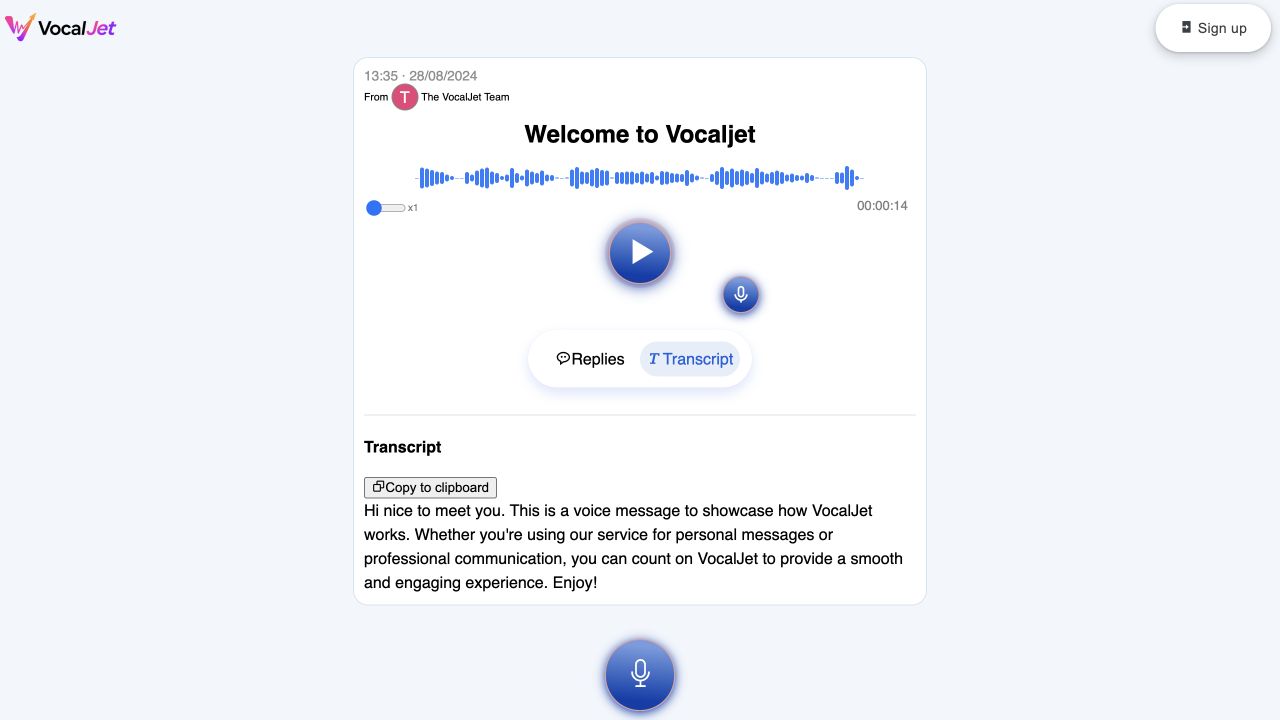
VocalJet’s shared-recording screen showing the welcome waveform and its saved transcript, with a Sign up button visible.
Actual app screenshot captured on 31 October 2026 in a separate, signed-out browser. The existing welcome recording played to the end and its saved transcript matched the text above. The recording itself is dated 28 August 2024. This verifies guest access and the saved example; it is not a new transcription run or an accuracy benchmark. Open the full-size screenshot.

Guest recording walkthrough

One new message.
Or a reply to a recording.

The profile and shared-recording entry screens were checked without signing in on 31 October 2026. The send-and-receive steps below are checked against the app’s source code; sending a new message and verifying its receipt still need a fresh full test.

01 / Start a conversation

Use your personal profile link

Link pattern: /u/{personal_url}

Use this when you want a new project request. You do not need to record a prompt first. Send the questions alongside your profile link.

  1. Owner: copy the profile link. Use the personal link from your account, not the example pattern above.
  2. Guest: choose “Send me a voice message”. Allow microphone access in the browser, then record a short answer within the limit shown in the app.
  3. Guest: review and send. Supply a name of 3–50 characters. Email is optional; if entered, it must be valid. Check the recipient before sending.
  4. Owner: verify receipt. Sign in, locate the incoming recording and listen. Review the transcript when processing completes; missing text is not a successful transcription.

An invitation you can adapt

Please leave a short voice note at [your personal profile link]. Tell us the project goal, what is needed and what is still undecided. Keep within the recording limit shown. You will need to allow microphone access and add your name; email is optional.

No guest account is required to submit through this route. The owner’s library still requires a sign-in. A profile link does not grant access to the rest of that library.

See the fictional website intake example →

02 / Continue a conversation

Share a saved recording

Link pattern: /voice/{recording_id}

Use this when the guest needs to hear your message first. Save the recording, then use its sharing link.

  1. Owner: save the opening message. Record the question or context and copy the saved recording’s link.
  2. Guest: open and listen. Check that this is the intended conversation before recording a response.
  3. Guest: record the reply. Allow microphone access, review the recording, add a name and send. Email is optional and no guest account is required.
  4. Owner: check the conversation. Verify that the reply belongs to the original recording. Listen and check the processed text before using it in a brief or follow-up.

A reply request you can adapt

Please listen to [your saved recording link] and leave a short voice reply in that conversation. Tell us what should change and what should stay. Use the recording limit shown and add your name so we can identify the reply.

Sharing a recording and receiving a reply are separate from reviewing scope, assigning tasks or sending an email. Those decisions remain with your team.

See the fictional revision feedback example →
If the recording or transcript is missing Checks to make before repeating the send
  1. 01

    Microphone unavailable

    Check the browser’s microphone permission and selected input device, then try the recording control again. Do not treat an empty recording as a completed message.

  2. 02

    Send rejected

    Check the required name and any email entered. Confirm the destination link and any error shown before sending again.

  3. 03

    Audio received, text missing

    Keep the original audio and check processing status. Do not replace an absent transcript with the prepared recording script or describe it as generated text.

  4. 04

    Testing the full journey

    Use an account and recording you control. Verify the actual incoming audio and reply in the owner’s library, then compare each transcript with its recording.

The routes and required fields are documented from the app’s profile, recording and send controls. No customer data or test-account destination is published here. Download the end-to-end verification checklist.

Two fictional projects

Different requests.
Different decisions.

The companies, people and requests below are invented demonstration data. They are not testimonials, measured outcomes or evidence of customer adoption.

Fictional design studio · Maya, fictional contact

A website brief before the proposal

What is actually included in this website request?

Download walkthrough

02 / Human review

Keep the words. Make the decisions explicit.

These review notes are manually written examples. VocalJet provides recording and transcription; the team interprets the request and agrees the work.

  • Requested scope

    To confirm

    “a homepage, a services page and a contact page”

    Three page types, plus an inquiry form. Keep CRM work separate until clarified.

    Agency: list the pages and form destination in the proposal.

  • Timing and budget

    Open question

    “launch in six weeks, but I still need to approve the budget”

    Six weeks is the client’s target. It is not an accepted deadline or evidence of a funded project.

    Client: confirm the budget. Agency: assess the schedule after inputs are known.

  • Dependency

    Open question

    “copy and photographs, although they aren’t ready yet”

    Content preparation may affect the schedule. No content delivery date has been supplied.

    Client: propose copy and photograph delivery dates.

  • Scope boundary

    Separate estimate

    “whether connecting the form to our CRM would be a separate cost”

    Integration complexity and price have not been established.

    Agency: ask which CRM, fields and routing rules are needed before estimating.

03 / Close the loop

A reply ready for your review

Manually written. Unsent. No AI follow-up feature is implied.

Thanks, Maya. I’ve noted three pages and an inquiry form, with no shop or booking system. Before we prepare a proposal, please confirm the budget range, when copy and photographs will be ready, and which CRM you use. We’ll define what one revision round covers and assess CRM integration separately. We can then confirm whether the six-week target is feasible. This is a summary for review, not an agreed scope or delivery commitment.
Download
See the full product walkthrough Personal profile → new incoming message

Prepared from the app’s source code. A fresh authenticated end-to-end run has not been performed.

  1. 01

    Prepare the intake prompt

    The account owner copies their personal profile link and sends the prompt alongside it. The profile route accepts a new message; no existing voice memo is required.

  2. 02

    Client leaves context

    The fictional client opens the profile link, uses “Send me a voice message”, allows microphone access and records the script. A sender name is required; email is optional.

  3. 03

    Owner checks the recording

    The owner signs in, opens the incoming message, listens and reviews the transcript after processing. If processing fails or text is missing, show that state and do not substitute the script as a generated transcript.

  4. 04

    Build the reviewed brief

    The agency identifies facts and open questions manually, then enters the checked information in the public brief builder. The builder formats these answers; it does not extract them from audio.

  5. 05

    Prepare a reply

    The agency copies the draft below into its own email tool, checks it and sends it only when ready. VocalJet does not automatically write or send this draft.

Turn the checked notes into a reusable brief.

Fictional furniture workshop · Alex, fictional contact

Revision feedback with a scope boundary

Which comments are revisions, questions or extra work?

Download walkthrough

02 / Human review

Keep the words. Make the decisions explicit.

These review notes are manually written examples. VocalJet provides recording and transcription; the team interprets the request and agrees the work.

  • Headline revision

    Check agreement

    “explain more clearly that we build furniture to order”

    The desired meaning is specific. Copy-editing coverage still depends on the original agreement.

    Alex: send proposed wording. Freelancer: check revision coverage and prepare a draft.

  • Visual direction

    Decision needed

    “a quieter option, but I don’t have a colour in mind”

    The feedback describes prominence, not an approved replacement colour.

    Freelancer: show two treatments and ask the founder to choose.

  • Possible added work

    Separate estimate

    “add a French version and connect the contact form to our CRM”

    Two distinct requests. Neither is automatically in scope or already delivered.

    Freelancer: check the quote, then ask about page count, translations and CRM requirements.

  • Review milestone

    Date to confirm

    “before Friday; that’s a review date, not a launch date”

    Preserve the distinction between review and launch. The calendar date is unspecified.

    Alex and freelancer: confirm the date, review owner and required inputs.

03 / Close the loop

A reply ready for your review

Manually written. Unsent. No AI follow-up feature is implied.

Thanks, Alex. I’ve separated the feedback into headline wording, button treatment, French pages and CRM integration. Please send the suggested headline on Monday and confirm the calendar date. I’ll check which revisions the current agreement covers and propose two button treatments. French pages and CRM work need a scope check and, where required, a separate estimate. I’ve understood Friday as a founder review target, not a launch commitment. Please confirm the review date and who gives final approval.
Download
See the full product walkthrough Saved voice prompt → link → client reply

Prepared from the app’s source code. A fresh authenticated end-to-end run has not been performed.

  1. 01

    Record the review prompt

    The owner records and saves the short prompt above. A saved recording must exist before using its /voice/ conversation link.

  2. 02

    Share the recording link

    The owner copies the saved message’s sharing link and sends it through their chosen channel. The example does not imply email integration or automatic outreach.

  3. 03

    Client replies by voice

    The fictional client opens the shared message and uses the reply control. The guest supplies a name and records the script without creating an account. Email is optional.

  4. 04

    Check and classify the reply

    The owner listens and checks the transcript. The four decision notes below are editorial review examples, not automatic VocalJet classifications.

  5. 05

    Confirm scope and follow up

    The freelancer checks the actual agreement, assigns owners and confirms dates in their own workflow. The reply below is a manually written draft, not a sent email or app-generated output.

Turn the checked notes into a reusable brief.

A working tool

Make the brief
your own.

This is the same manual formatter used by the public VocalJet brief template. It formats the answers you enter, ready to copy or download. It does not process audio or generate AI conclusions.

What this demonstrates

Useful examples.
Clear provenance.

Original app material
Two unchanged onboarding audio files and their matching saved transcripts. On 31 October 2026, the welcome recording and saved text were also checked in the actual app through its signed-out sharing view. The screenshot documents that existing sample, not a new recognition test.
Product walkthroughs
Two scripts grounded in the product code. Profile access, shared-recording playback and saved-transcript display were observed without sign-in. A new recording, transcription and end-to-end send/receipt have not yet been verified for these scenarios.
Editorial work
The project briefs, scope decisions and reply drafts are written examples. They are not automatic summaries, task assignments or AI-generated outputs from VocalJet.
About the fictional projects
Northstar Studio and Cedar Workshop are fictional companies used to illustrate two workflows. Their briefs and replies are written examples, not real customer results.